
OPERATION MANUAL
Dragon Sic Bo
Version 7D-SIC-OP-ALL-011
April 19, 2019
2.4.2 Stations
インスト 4.2と同じ記述
- Check that the Center unit has been booted up.
- Turn the Center stations power ON, and then turn also the Extension stations power ON, if any. It takes 2-3 minutes for the Center stations to boot up.
 CAUTION!
Do not touch the touch screen during power-up operation.
The touch screen may malfunction.
NOTE:
If a POWER UP SELF TEST error appears, the activation of the stations halts.
Referring to the troubleshooting in our Service Manual, clear the error.
NOTE:
If clearing the RAM data is necessary, refer to Paragraph 8.1 of our Service Manual.
Main SW
Door chain
r
SW ON
Stations
SW ON
Center Unit
Power source
ON OFF
Please follow the below procedure to load tickets into the ticket supply tray:
Ticket Printer
2.5.1 When printer is EPIC (Ithaca) printer
- Open the main door and locate the ticket printer.
- Load tickets into the ticket supply tray, making sure that the black dot is positioned as shown below:
- Insert the leading ticket into the printer’s insertion guide until about a half of the ticket is fed into the mechanism.
- The printer automatically completes the feeding process.
2.5.2 When printer is GEN2 Universal (FutureLogic) printer
- Open the main door and locate the ticket printer.
- Place the paper stack on the paper tray as indicated by the label on the bottom of the tray.
- Feed the paper into the paper loading slot until the printer takes hold of the paper.
- The printer automatically completes the feeding process.
2.5.3 When printer is PayCheck (Nanoptix) printer
- Open the main door and locate the ticket printer.
- Place the paper stack on the paper tray so that the “top of form” mark is oriented as depicted below:
- Feed the paper into the printer mechanism until the resistance is felt.
- The printer automatically completes the feeding process.
2.6 Adjusting Game Sound Volume
Adjust the sound volume referring to Paragraph 5.7 “SOUND SETTING” for the Stations, and Paragraph 6.6 for the Center Unit.
2.7 Checking Machine Identification
Check the machine identification referring to Paragraph 5.8 “MACHINE IDENTIFICATION” for the Stations, and Paragraph 6.7 for the Center Unit.
POWER-ON CHECK LIST
- Verify no error occurred during the POWER-UP self-test.
- Verify the illuminations are properly turned ON.
- Verify inserted bills/coins/tickets are correctly posted to the credit meters.
- Verify the ticket printers normally work.
- Verify the game buttons and the keyswitches are properly actuated.
- Verify the monitor screens are properly turned ON.
- Verify the sound speakers properly produce sounds.
- Verify the hoppers properly pay out coins if any.
- Verify the dices are normally being shaken.
Chapter 3: How to Play
ステッカー耐久試験の結果、NOTEを追加した。20190305 井上依頼
20170321 長野Standardも消した
20170113 ラウラ
「white, red and blue.」消しました
オリギナルは
⑧03(SIC)How To Play(WW_OP)改定 20161026 ※WW SICから
Sic Bo is an ancient Chinese game, played with three dice.
In a Sic Bo game play, you bet on the numbers and/or combination of numbers you think will appear after the three dice are mechanically shaken.
NOTE:
It is recommended to replace the dice for Dragon Sic Bo every 6 months.
2018/02/22 LAURA
修正
In Dragon Sic Bo, according to the Progressive function being ENABLED/DISABLED, it is possible to select one of two possible Play Styles.
 CAUTION!
In Dragon Sic Bo, the bet screen changes according to the settings. Refer to the chart below, and use the dice set corresponding to each of the bet screen variations. Not using the correct dice set may cause errors during the game.
2018/02/22 LAURA
修正
SPECIAL
SPECIAL
NORMAL
IMPORTANT SETTING > JACKPOT CHANCE
DISABLED
ENABLED
Type B-1
Type B-2
Type A
SPECIAL
NORMAL
GAME SETTING > DICE TYPE


Type A
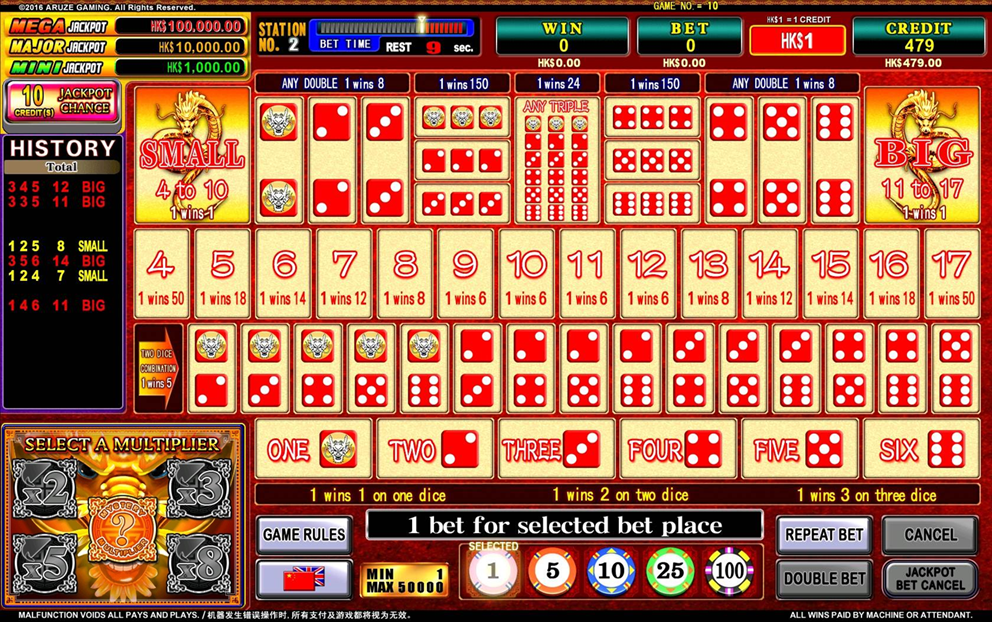
If the item IMPORTANT SETTING > JACKPOT CHANCE is set on “PROGRESSIVE JACKPOT” or “FIXED JACKPOT” (Service Manual 3.2.2), the Type A bet screen is displayed. Refer to the image below, and use the “SPECIAL” dice (DRAGON symbol Dice Set).
2018/02/22 LAURA
修正
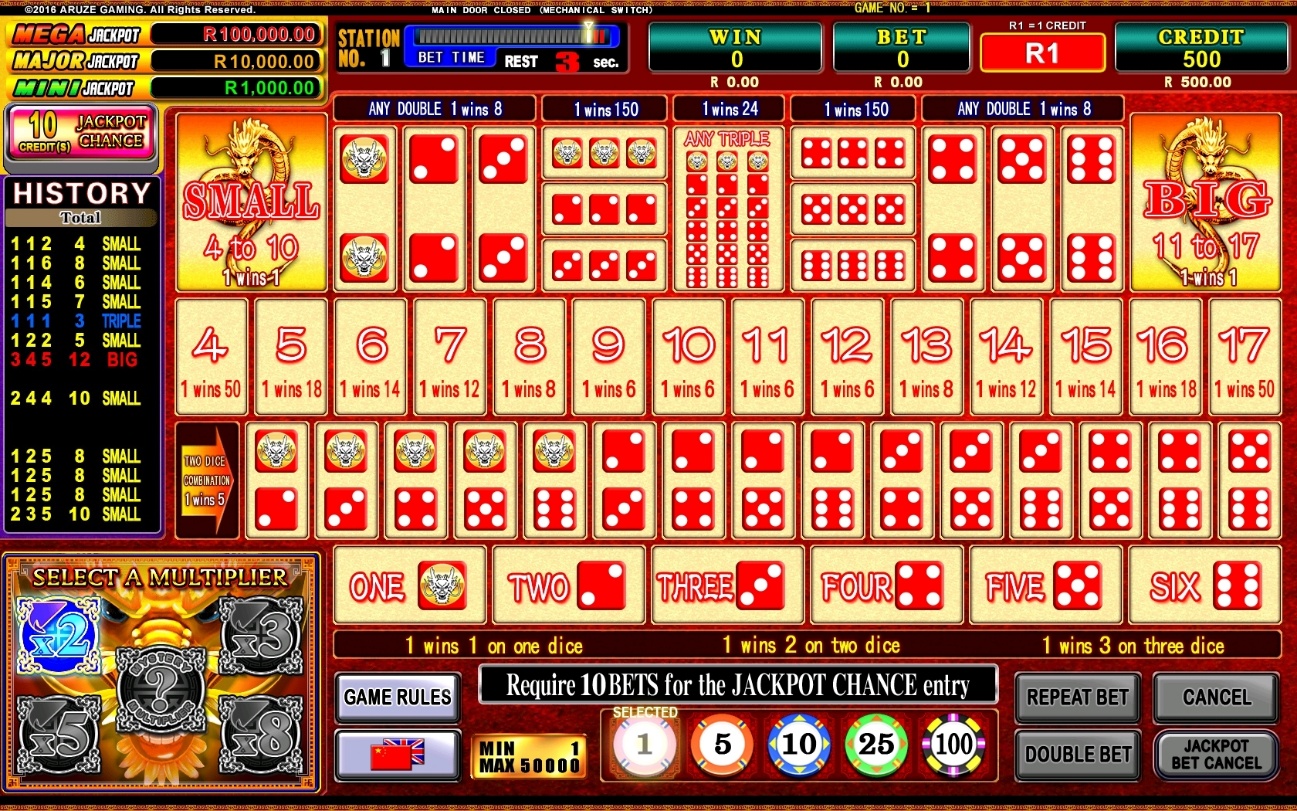
DRAGON symbol Dice Set



NOTE:
If the item IMPORTANT SETTING > JACKPOT CHANCE is set on “OFF” (Service Manual 3.2.2), on GAME SETTING (Service Manual 3.2.2), on GAME SETTING the setting item “DICE TYPE” is displayed (refer to Service Manual 3.2.3).
2018/02/22 LAURA
修正
Type B-1
If the item GAME SETTING > DICE TYPE is set on “NORMAL” (Service Manual 3.2.3), the Type B-1 bet screen is displayed. Refer to the image below, and use the “NORMAL” dice.
2018/02/22 LAURA
修正
NORMAL Dice Set



Type B-2
2018/02/22 LAURA
修正
If the item GAME SETTING > DICE TYPE is set on “SPECIAL” (Service Manual 3.2.3), the Type B-2 bet screen is displayed. Refer to the image below, and use the “SPECIAL” dice (DRAGON symbol Dice Set).
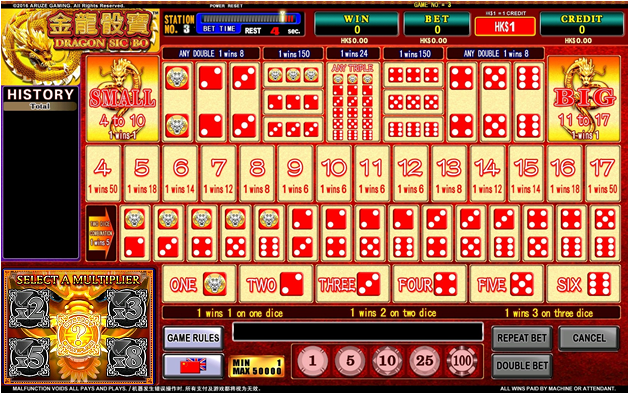
DRAGON symbol Dice Set



3.1 Parts of Game Screen
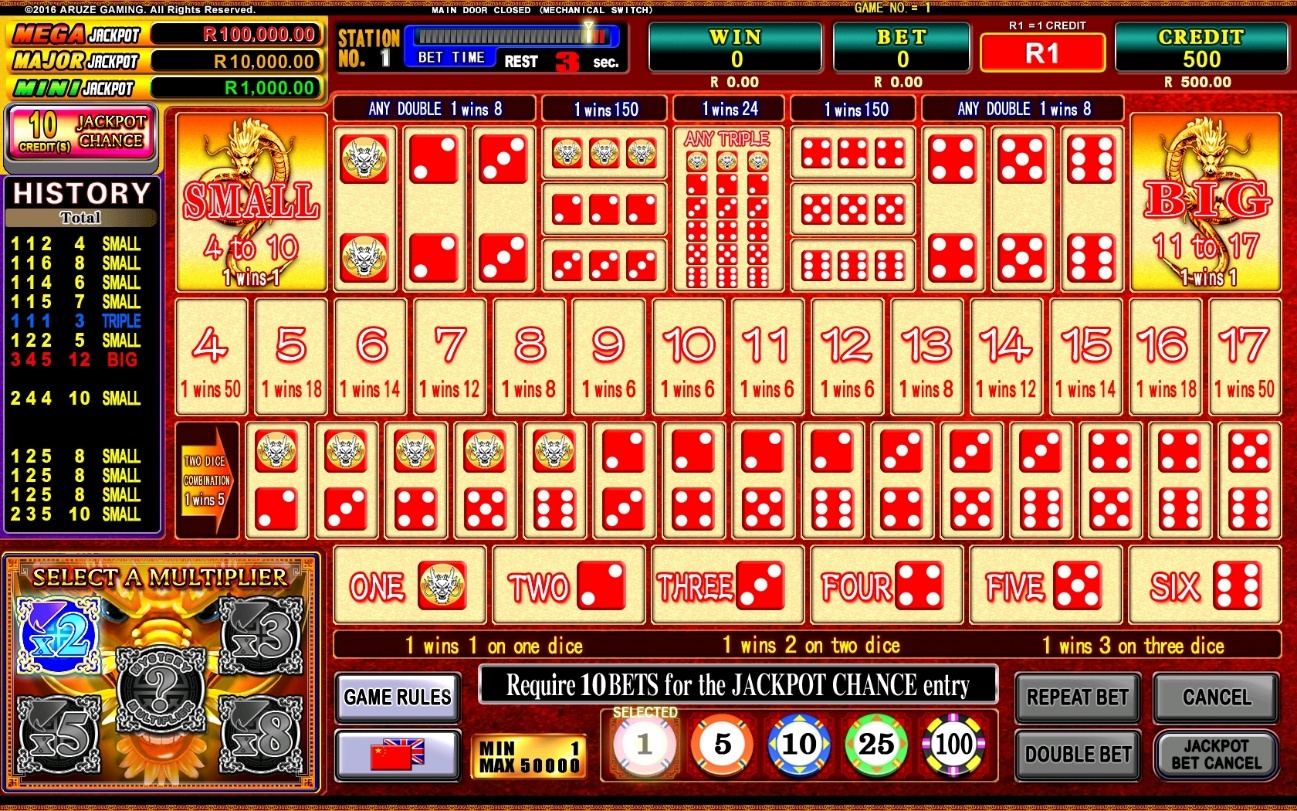
| # | Item Name | Functionality |
| 1 | GAME HISTORY | The game results of last 15 games are displayed. |
| 2 |  | Places the bet for the Jackpot chance game. |
| 3 | JACKPOT CHANCE WINDOW | Shows the current value for each progressive level jackpot. |
| 4 | BET TIME COUNTER | The remaining bet time is shown in seconds along with time bar |
| 5 | CREDIT METER | Credit, with the amount expressed also in monetary value, is showed. WIN METER and BET METER are displayed similarly. |
| 6 | BET AREA | 50 bet spots are shown. The player makes bet by touching the spot. |
| 7 | 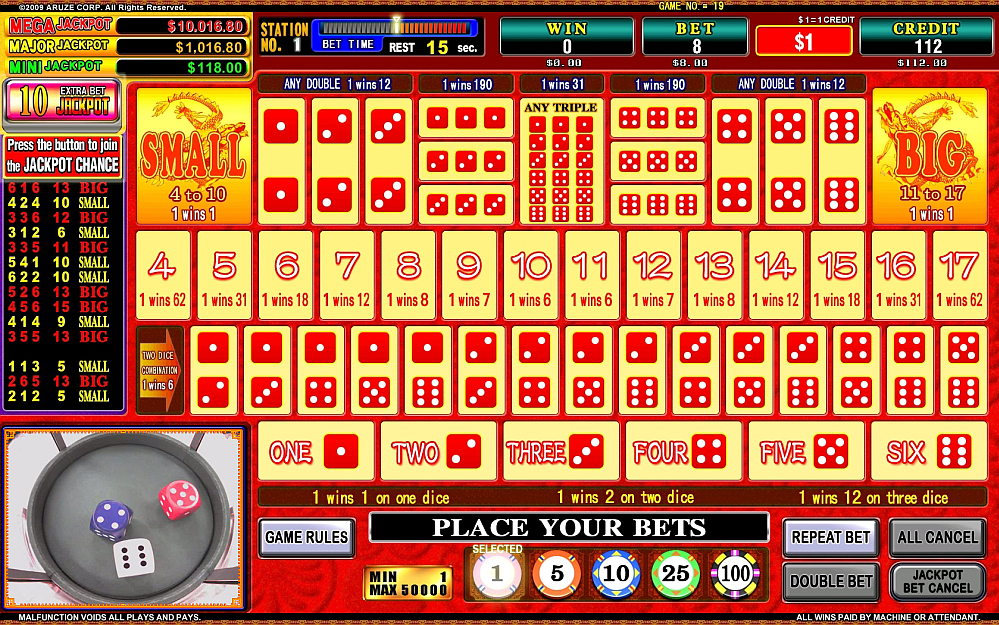 | MULTI BET: The button configuration can be set in AUDIT mode. Used to select how many credits are bet among 1, 5, 10, 25, 50, 100, 500, 1000, 5000 and 10000 credits by touching a spot once. |
| 8 |  | Places the same bet combination as the previous one. It can’t be used when there is not enough credit. |
| 9 |  | All the bets placed on the bet spots for the main game are doubled. It can’t be used when there is not enough credit. |
| # | Item Name | Functionality |
| 10 |
or
| Cancels the bets for the main game. 2018/02/22 LAURA 追加 CANCEL After the CANCEL button has been pushed, it is possible to cancel the bets to withdraw by touching the spots they are placed on. ALL CANCEL Push the ALL CANCEL button to cancel all the bets placed for the main game. NOTE: CANCEL or ALL CANCEL can be selected in the AUDIT. When the progressive game is ENABLED and MIN.BET FOR SIDE GAME (CREDITS) is set on more than 1, if a bet has been placed on the JACKPOT CHANCE GAME, it will be possible to cancel the bets for the main game only after the JACKPOT CHANCE GAME bet has been cancelled. 20170426 ラウラ 修正 |
| 11 | 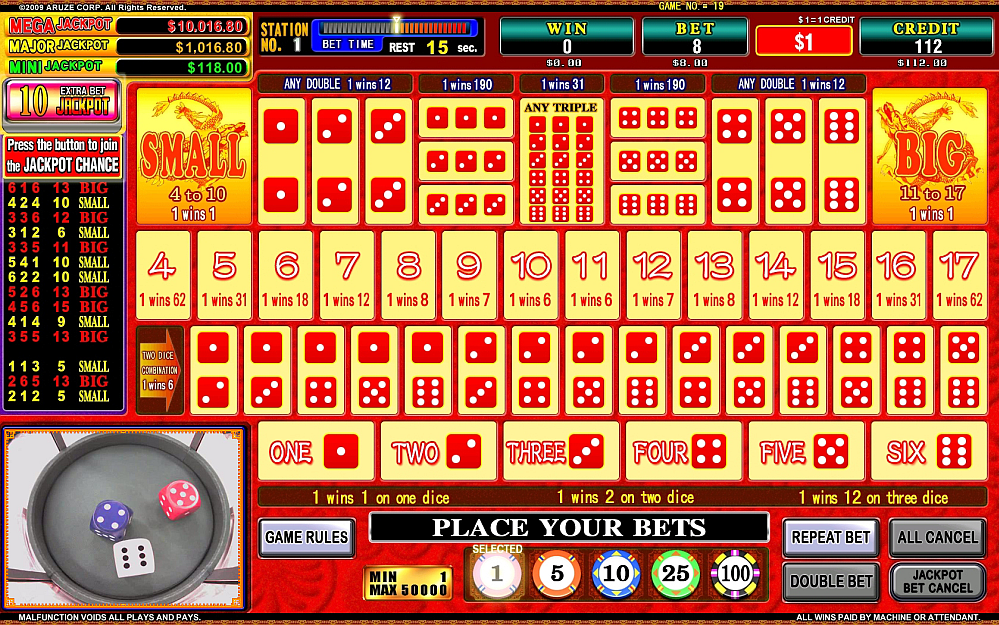 | Cancels the bet for the JACKPOT CHANCE GAME. |
| 12 |  | Opens the Game rules page. NOTE: 20170113ラウラ 画面交換 If HK$, SGD or MOP is the selected currency, pressing the GAME RULES button displays the GAME INFORMATION on the screen. If the GAME RULES button is pressed again, HELP will be displayed on the screen. 20180824長野.ラウラ フィリピン指摘 |
| 13 |  | Changes the language. (According to the settings on AUDIT this item may not be displayed). |
| 14 | MULTIPLIER SELECTION/ LIVE WINDOW | During bet time, shows the multiplier choices (if multiplier spot is enabled). During play and winning time, shows the main unit dice field. Touch the window to close up the live image. 20170113 ラウラ MULTIPLIER SELECTIONについて追加 LIVE WINDOW |


3.2 Game Buttons on Station
クラウンメルボルン用に、あらかじめiボタンを追加した。20161014
CHANGE button
CASH OUT button
or
i button
GAME RULES button
SHOOTER button
20180824長野.ラウラ
誤SHOOTフィリピン指摘
20170317 Laura
Extra Bet for jackpot消しました
CHANGE Button:
Used to call an attendant.
CASHOUT Button:
Used to cash out accumulated credits.
or
i Button:
Enter the Player Tracking Section, the Player Information Display (PID) screen or the game rules.
GAME RULES Button:
Used to display the GAME RULES screen.
SHOOTER button:
20180824長野.ラウラ
誤SHOOTフィリピン指摘
Used to stop dice shaking.
3.3 Game Flow
20170317 Laura
Extra Bet for jackpot消しました
20170113 ラウラ
画面に合わせました
A Sic Bo game cycle is composed of step A to D as follows
NOTE:
Statistically, one game play takes about 60 seconds, and about 1400 game plays are carried out per day (24 hours).
- BET TIME (Default: 30sec)
- SHOOTER TIME (Default: 10sec)
- PLAY TIME (Max: 10sec)
20170426 ラウラ
追加
- WINNING TIME (Max: 6sec)
20170426 ラウラ
追加
- Insert coins, tickets or bills to post credits to your CREDIT meter.
- When the betting time has come, select your desired spot(s) by touch.
To cancel your bet:
Touch the CANCEL button and then touch the spot(s) you want to cancel, or press ALL CANCEL.
If nobody places a bet, the game returns to the beginning of BET TIME.
20180824長野.ラウラ
誤SHOOTフィリピン指摘
SHOOTER TIME
The dice shaking can be stopped by pressing the SHOOTER button.
PLAY TIME
20170127 ラウラ
Dragon Sicbo修正
The game is carried out during this time period.
The dice are shot.
WINNING TIME
The winning number or combination is announced.
Your win is posted to your credit meter.
NOTE:
The maximum number of credits that can be accumulated on the CREDIT meter is determined by the software setting of “CREDIT UP LIMIT”.
If the CREDIT meter exceeds this limit when a win is added, the win is handpaid by an attendant.
JACKPOT CHANCE game (if triggered)
20180824長野.ラウラ
JACKPOT CHANCE game may be triggered during this bet time.
The JACKPOT CHANCE game takes Max. 50 seconds.
20170426 ラウラ
修正
3.3.1 Bet Time
The bet time can be set within a range from 20 through 60 sec (default: 30 sec) in “BET TIME (SECONDS)” of GAME SETTING in the AUDIT mode on the main unit.
– How to Bet –
Place your bet in the following procedure within the betting time period.
(When no player places a bet, the bet time is repeated until someone places a bet.)
- Select the number of credits to bet by touching your desired MULTI BET button.
- Bet the selected number of credits on your desired spot by touching it.
A chip is placed on the spot.
The bet amount can be doubled by pressing the DOUBLE BET button.
During this time it is also possible to bet for the JACKPOT CHANCE side game.
- If DRAG CHIP option is enabled, it is possible to change the betting spot dragging the chip to another spot.
- Repeat the above steps 1 through 3. To play a game, you have to bet credits equal to the MIN TOTAL PLAY CREDIT or more.
NOTE:
MIN TOTAL PLAY CREDIT can be set on GAME SETTING in the AUDIT mode on mode of the station.
NOTE:
If the GRAY CHIP function is enabled, chips that have not reached the minimum bet for any given bet area are displayed in grey and return to the player when the betting time is over.
To cancel your bet:
Touch the CANCEL button, and then touch the spot(s) you want to cancel.
Otherwise, drag the chips out of the bet table. (if DRAG CHIP option is enabled).
NOTE:
Canceling your bet is available only when the CANCEL button is lit.
When you bet on JACKPOT CHANCE game, you can cancel your bets on the Sic Bo base game only by canceling the bets on the JACKPOT CHANCE game first.
- To return to the betting screen, touch the CANCEL button again.
20170213 ラウラ
「When a game play is being carried out, a player can bet for the next game.
In this case, if an error occurs in the current game, the bets for the next game will be returned to the player.」削除
3.3.1.1 List of Available Bets
20170426 ラウラ
文法修正
The following is a list of the available bets:
| Big | The total score of the dice will be between 11 and 17. Triples are excluded. |
| Small | The total score of the dice will be between 4 and 10 Triples are excluded. |
| Any Number | Any specific number from 1 to 6. |
| Dice Total | The total of the three dice is a specific number from 4 through 17. |
| Two Dice Combination | Two of the dice show a specific combination of two different numbers (for example, 3 and 4). |
| Double | Any pair (for example two 1’s). Two dice show the same numbers you selected. |
| Triple | Specific triples (for example three 1’s). Three dice show the same numbers you selected. |
| Any triple | Any triples (for example three 1’s). Three dice show the same numbers, but it can be any possible number from 1 to 6. |
3.3.1.2 List of ODDS
20180824長野.ラウラ
フィリピン指摘
There are 6 ODDS types that can be set in “ODDS TYPE” of IMPORTANT SETTING in the AUDIT mode on the main unit.
The display for “DICE TOTAL” spots on the bet area changes according to the ODDS selected for the game:
“DICE TOTAL” SPOTS DISPLAY FOR TYPE A ODDS





“DICE TOTAL” SPOTS DISPLAY FOR TYPE B ODDS
“DICE TOTAL” SPOTS DISPLAY FOR TYPE C ODDS
“DICE TOTAL” SPOTS DISPLAY FOR TYPE D ODDS
20180824長野.ラウラ
フィリピン指摘
“DICE TOTAL” SPOTS DISPLAY FOR TYPE E ODDS
Displayed according to currency
20180824長野.ラウラ
フィリピン指摘
“DICE TOTAL” SPOTS DISPLAY FOR TYPE F ODDS
Displayed according to currency
The following shows the ODDS of each type:
| Bets | TYPE A ODDS | TYPE B ODDS | TYPE C ODDS | TYPE D ODDS | TYPE E ODDS | TYPE F ODDS |
| Big | 1 wins 1 | |||||
| Small | ||||||
| Any Number | ||||||
| Any specific on 1 dice | 1 wins 1 | |||||
| Any specific on 2 dice | 1 wins 2 | |||||
| Any specific on 3 dice | 1 wins 3 | 1 wins 3 | 1 wins 12 | 1 wins 12 | 1 wins 12 | 1 wins 3 |
| Dice Total | ||||||
| 4 | 1 wins 50 | 1 wins 50 | 1 wins 62 | 1 wins 69 | 1 wins 65 | 1 wins 53 |
| 5 | 1 wins 18 | 1 wins 30 | 1 wins 31 | 1 wins 34 | 1 wins 32 | 1 wins 30 |
| 6 | 1 wins 14 | 1 wins 18 | 1 wins 18 | 1 wins 20 | 1 wins 19 | 1 wins 18 |
| 7 | 1 wins 12 | 1 wins 12 | 1 wins 12 | 1 wins 13 | 1 wins 12 | 1 wins 12 |
| 8 | 1 wins 8 | 1 wins 8 | 1 wins 8 | 1 wins 9 | 1 wins 8 | 1 wins 8 |
| 9 | 1 wins 6 | 1 wins 6 | 1 wins 7 | 1 wins 7 | 1 wins 7 | 1 wins 6 |
| 10 | 1 wins 6 | 1 wins 6 | 1 wins 6 | 1 wins 6 | 1 wins 6 | 1 wins 6 |
| 11 | 1 wins 6 | 1 wins 6 | 1 wins 6 | 1 wins 6 | 1 wins 6 | 1 wins 6 |
| 12 | 1 wins 6 | 1 wins 6 | 1 wins 7 | 1 wins 7 | 1 wins 7 | 1 wins 6 |
| 13 | 1 wins 8 | 1 wins 8 | 1 wins 8 | 1 wins 9 | 1 wins 8 | 1 wins 8 |
| 14 | 1 wins 12 | 1 wins 12 | 1 wins 12 | 1 wins 13 | 1 wins 12 | 1 wins 12 |
| 15 | 1 wins 14 | 1 wins 18 | 1 wins 18 | 1 wins 20 | 1 wins 19 | 1 wins 18 |
| 16 | 1 wins 18 | 1 wins 30 | 1 wins 31 | 1 wins 34 | 1 wins 32 | 1 wins 30 |
| 17 | 1 wins 50 | 1 wins 50 | 1 wins 62 | 1 wins 69 | 1 wins 65 | 1 wins 53 |
| Two Dice Combination | ||||||
| 1 and 2 | 1 wins 5 | 1 wins 5 | 1 wins 6 | 1 wins 6 | 1 wins 6 | 1 wins 5 |
| 1 and 3 | ||||||
| 1 and 4 | ||||||
| 1 and 5 | ||||||
| 1 and 6 | ||||||
| 2 and 3 | ||||||
| 2 and 4 | ||||||
| 2 and 5 | ||||||
| 2 and 6 | ||||||
| 3 and 4 | ||||||
| 3 and 5 | ||||||
| 3 and 6 | ||||||
| 4 and 5 | ||||||
| 4 and 6 | ||||||
| 5 and 6 | ||||||
| Bets | TYPE A ODDS | TYPE B ODDS | TYPE C ODDS | TYPE D ODDS | TYPE E ODDS | TYPE F ODDS |
| Any Triple | 1 wins 24 | 1 wins 24 | 1 wins 31 | 1 wins 34 | 1 wins 32 | 1 wins 26 |
| Double | ||||||
| Two 1’s | 1 wins 8 | 1 wins 8 | 1 wins 12 | 1 wins 12 | 1 wins 12 | 1 wins 10 |
| Two 2’s | ||||||
| Two 3’s | ||||||
| Two 4’s | ||||||
| Two 5’s | ||||||
| Two 6’s | ||||||
| Triple | ||||||
| Three 1’s | 1 wins 150 | 1 wins 150 | 1 wins 190 | 1 wins 209 | 1 wins 200 | 1 wins 161 |
| Three 2’s | ||||||
| Three 3’s | ||||||
| Three 4’s | ||||||
| Three 5’s | ||||||
| Three 6’s | ||||||
3.3.1.3 HISTORY Window (Game Trend Analytic Information)
20170426 ラウラ
スペルミス修正
20170426 ラウラ
修正
Results of the last games are displayed on the HISTORY window on the main screen, and can be used by the player to review the game trend analytic data.
In this window, the oldest game result is displayed at the bottom, and the latest result at the top.
Each game result shows, from left to right, (1) number of the dice 1, (2) number of the dice 2, (3) number of the dice 3, (4) total of three dice, and (5) BIG, SMALL or TRIPLE.
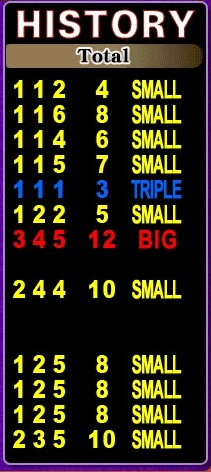
Latest game result
Oldest game result
20170426 ラウラ
修正
3.3.2 Shooter Time
20180824長野.ラウラ
誤SHOOTフィリピン指摘
20170213 ラウラ
「JACKPOT CHANCE」はBase Gameの後に行うので、順番変わりました。
The dice shaking can be stopped by pressing the SHOOTER button.
According to the setting of “PLAYER DICE SHOOTING” in AUDIT mode, the possibility for the player to shoot the dice can be disabled or set in the following two methods.
Setting: BET VALUE
A player who bet credits equal to the preset DICE SHOOTING VALUE or more, and bet most among all the players can get the right to stop the shaking dice by pressing the SHOOTER button.
20180824長野.ラウラ
誤SHOOTフィリピン指摘
If the highest bet is placed by more than one player, the shooter right goes to the player who placed it first.
NOTE:
- The DICE SHOOTING VALUE can be set on GAME SETTING in the AUDIT mode on the main unit.
20180824長野.ラウラ
誤SHOOTフィリピン指摘
- The player should press the SHOOTER button within the PLAYER DICE SHOOTING TIME (5 – 15 sec, default: 10 sec). The PLAYER DICE SHOOTING TIME can be set on GAME SETTING in the AUDIT mode on the main unit.
20180824長野.ラウラ
フィリピン指摘
- When the preset PLAYER DICE SHOOTING TIME has elapsed, the dice are automatically shot.
SHOOTER button
20180824長野.ラウラ
誤SHOOTフィリピン指摘
Setting: BY TURN
Each participating player has a chance to shoot the dice by turns.
20180824長野.ラウラ
誤SHOOTフィリピン指摘
When the chance is given, the SHOOTER button lights up.
If no bet is placed, the chance moves to another player.
NOTE:
20180824長野.ラウラ
フィリピン指摘
When the preset PLAYER DICE SHOOTING TIME has elapsed, the dice are automatically shot.
1
2
3
4
5
6
7
8
Setting: OFF
No player can shoot the dice.
When setting it to “OFF”, the dice are automatically shot after the betting time ends.
3.3.3 Play Time
During the Game Time phase, the game play is carried out.
MULTIPLIER SPOT
- Once the player insert credit, the live camera feed will change into the multiplier selection screen.
- Within the bet time, the player can select the multiplier to apply for the game from x2, x3, x5, x8 and “Mystery multiplier”. If “Mystery multiplier” is chosen, a multiplier selection animation will show the randomly selected multiplier that will be applied for the game.
- The selected multiplier will randomly appear on some bet spot. It is possible that no multiplier on any bet spot.
- If the player hits a win on a bet spot with multiplier, the odds of the win will be multiplied according to the selection made.
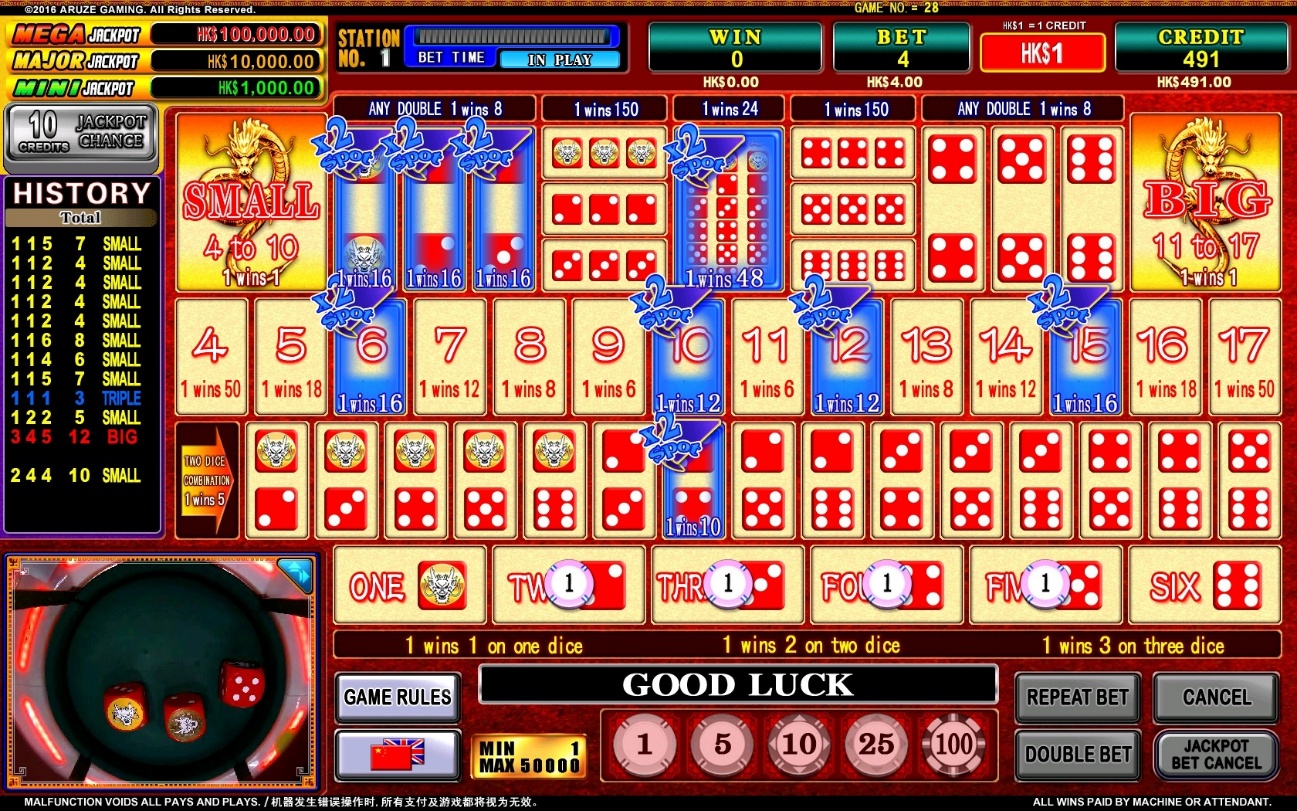
MULTIPLIER symbol
20170213 ラウラ
1・プレイヤーがクレジットを入れると、カメラ映像はMultiplier Selection画面に変わります。
2・ベットタイム以内に、プレイヤーがx2・x3・x5・x8・「Mystery Multiplier」の中にゲームのMultiplierを選択できます。Mystery Multiplierを選択すると、Multiplier SelectionアニメーションでゲームのMultiplierが表示されています。
3・選択のMultiplierはランダムでベットスポットに表示されています。どこにもMultiplierが表示されていない場合もあります
4・Multiplierがあるベットスポットのウィンが当たるとウィンのOddsはMultiplierに賭けられています。」
3.3.4 Winning Time
The winning number and/or combinations of numbers are announced.
Wins are moved to the credit meter.
NOTE:
The maximum number of credits that can be accumulated on the CREDIT meter is determined by the “CREDIT UP LIMIT” preset in the AUDIT mode.
3.3.5 JACKPOT CHANCE Game (Progressive Jackpot)
20170213 ラウラ
「ROUND BONUS」と「JACKPOT CHANCE」に交換しました
20170316 ラウラ
「jackpot chanceはEnabledの時、クライアントのリクエストで与えたダイスを使います。」
NOTE:
When the Jackpot chance game is enabled, it is required to use the dice set for progressive ON, provided at client request.
The JACKPOT CHANCE GAME can be played after the base game if the total wagered bet on the base game exceeds the MIN. BET FOR BONUS BET.
NOTE:
The MIN. BET FOR BONUS BET can be set on GAME SETTING in the AUDIT mode on the main unit.
20170426 ラウラ
Control panelのボタンについて削除+文法修正
Use the following procedure to play the JACKPOT CHANCE:
- When the JACKPOT CHANCE game is available, the EXTRA BET JACKPOT button on lights up.
- Press the button to play the JACKPOT CHANCE game.
20170822 LAURA
“Mystery” 消しました
If JACKPOT CHANCE SETTING is set to “FIXED JACKPOT”, by pressing the button, the SIDE BET ENTRY FEE is automatically deducted from your credit meter.
2018/02/22 LAURA
追加
2018/02/22 LAURA
追加
If JACKPOT CHANCE SETTING is set to “PROGRESSIVE JACKPOT”, by pressing the button, a confirmation window showing the range of prize that can be win according to the number of players participating to the side game, is displayed.
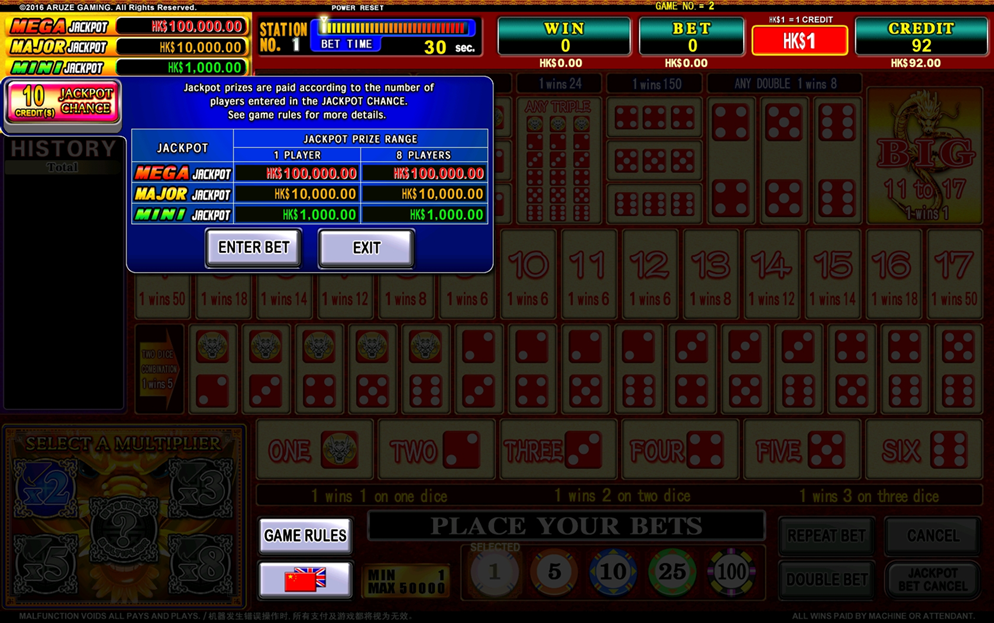
NOTE:
- To cancel your bets on jackpot, press the JACKPOT BET CANCEL button.
- If a bet is placed on the jackpot, no bet on the base game can be cancelled. However, once the JACKPOT BET CANCEL button is pressed, you can cancel your bets on the base game using the CANCEL button (ALL CANCEL button) or by dragging the chips out of the table.
- The SIDE BET ENTRY FEE can be set on GAME SETTING in the AUDIT mode on the main unit.
EXTRA BET JACKPOT button

20170317 Laura
Extra Bet for jackpot物理的ボタン消しました
- After the bet time, if the dice result is double 1 or triple 1, an anticipation sound will play, and JACKPOT CHANCE may be triggered.
- If triggered, participating stations will be displayed a “LOOK UP” message and non-participating stations will be held to wait.

Display on participant station
Opening display on the signage
- A roulette animation will be shown on the signage. When the prize symbols running along the signage stops, the displayed prize is awarded to the participants to the JACKPOT CHANCE.

Display on signage during Jackpot roulette
- If a credit prize is hit, each participant is awarded with the displayed credit value, if a JACKPOT is hit, each participant is awarded with the base value of the drawn JACKPOT, plus the increment value equally divided to the participating stations.
20170213 ラウラ
3・「BET TIME後、ダイス結果は二つの1または三つの1であれば、JACKPOT CHANCEトリガー可能性があります。
4・トリガーされるとゲームに参加しているStationに”LOOK UP”のメッセージが表示されていて、参加しないStationは待つ状態になります。
5・Signageにルレットが表示されています。流れるシンボルが止まると表示されているプライズがJACKPOT CHANCEに参加したプレイヤーに配当されます。
6・CREDIT PRIZE当たりの時、各参加者はクレジットをもらいます。JACKPOTの当たりの時、各参加者は選択されたJACKPOTのBASE VALUE + 参加したStationに分けたJACKPOTのIncrement.
Chapter 5: Audit Mode for Stations
オリギナルは
⑩05(SIC)Audit Mode for Stations(WW_OP)改定20161014ラウラ
過去の変更履歴は上記データに残し、この章はドラゴンでの差分を強調している。
5.1 Calling Audit Mode
When this station is on standby (that is, there is no credit or tilt on this station), you can access the soft meters in the following procedure:
RESET/AUDIT keyswitch
- Check that the Center Unit has been booted up.
- Open the main doors of the station.
- Turn station power ON. It takes 2-3 minutes for the station to boot up.
- To call the AUDIT mode, turn the key to the AUDIT position, and return it to the neutral position.
TOP MENU
SOUND SETTING
MAIN METERS
RETURN TO GAME
MACHINE IDENTIFICATION
ERROR METERS
TEST
LAST GAME RECALL
OUT OF SERVICE
PERIOD METER CLEAR
SETTING
RECALL METERS
5.2 Structure of Audit Mode
MAIN METERS
MASTER METERS
GLI METERS
FRENCH METERS
ONTARIO METERS
BILL METERS
SYSTEM RELATED IN/OUT METERS
ONLINE COMMUNICATION METERS
GAME METERS
WAGER CATEGORY METERS
PROGRESSIVE METER
ERROR METERS
MECHANICAL METER ERRORS
SYSTEM ERRORS
COIN ACCEPTOR ERRORS
HOPPER ERRORS
DOOR EVENTS
COMMUNICATION ERRORS
BILL ACCEPTOR ERRORS / EVENTS
TICKET PRINTER ERRORS
NETWORK CONDITION METERS
LAST GAME RECALL
CURRENT GAME
LAST GAME 01
LAST GAME 02
LAST GAME 03
LAST GAME 04
LAST GAME 05
LAST GAME 06
LAST GAME 07
LAST GAME 08
LAST GAME 09
LAST GAME 10
RECALL METERS
BILL RECALL
TICKET IN
TICKET OUT
CASHLESS TRANSACTION
PROMOTIONAL TRANSACTION
HOST BONUS TRANSACTION
DOOR HISTORY
ERROR HISTORY
ALL EVENT HISTORY
HAND PAY HISTORY
20180824長野.ラウラ
フィリピン指摘
SOUND SETTING
VOLUME SETTING
SOUND TEST
MACHINE IDENTIFICATION
SOFTWARE / FIRMWARE
PSD VERIFICATION (MD5 & CRC)
PSD VERIFICATION (HMAC-SHA1)
GAME INFORMATION
TEST (Refer to our Service Manual Chapter 4)
HOPPER TEST
MONITOR TEST
TOUCH SCREEN CALIBRATION
INPUT TEST
OUTPUT TEST
DIP SWITCH TEST
BILL ACCEPTOR TEST
SERIAL TEST
TICKET PRINT TEST
LIVE CAMERA CALIBRATION
SETTING (Refer to our Service Manual Chapter 2)
HARDWARE SETTING
HOPPER SETTING
BILL ACCEPTOR SETTING
AUDIT SETTING
IMPORTANT SETTING (or BASIC SETTING)
GAME SETTING
ONLINE SYSTEM
TICKET PRINT SETTING
OTHER SETTING
PERIOD METER CLEAR
OUT OF SERVICE
RETURN TO GAME
NOTE:
Some of the items listed above may vary or not be displayed according to the different jurisdictions.
5.3 MAIN METERS
The MAIN METERS consists of;
MASTER METERS
GLI METERS
FRENCH METERS
ONTARIO METERS
BILL METERS
SYSTEM RELATED IN/OUT METERS
ONLINE COMMUNICATION METERS
GAME METERS
WAGER CATEGORY METERS, and
PROGRESSIVE METERS
This machine has PERMANENT and PERIOD soft meters. The PERMANENT meters show the statistical accounting information since the last RAM clear. The PERIOD meters show the same but temporary information since either the last RAM CLEAR or PERIOD RESET whichever more recent. Refer to our Service Manual, Paragraph 8.1 for how to RAM CLEAR.
NOTE:
Audit reports may vary between jurisdictions, e.g. currency type and button layout.
Touch your desired meter to select it.
To return to the previous page, select “RETURN TO PREVIOUS MENU”, or press the CASHOUT button.
5.3.1 MASTER METERS
The following are the definitions of the MASTER METERS:
COIN IN
The total of all bets (displayed in currency amount), excluding Gamble bets.
COIN OUT
The total WIN amount excluding hand pays, SAS bonus, progressives, progressive base values, and increments.
COIN DROP
The total of coins inside the Coin Drop box.
PHYSICAL COIN IN
The sum of all the coins accepted by the machine.
PHYSICAL COIN OUT
2017/09/22 Laura
修正
The sum of all the coins paid out by the hopper.
ATTENDANT PAID JACKPOTS
2017/09/22 Laura
修正
The total value of hand paid credits from wins.
ATTENDANT PAID CANCELLED CREDITS
The total value of hand paid credits, including also the non-win credits.
NUMBER OF GAMES PLAYED SINCE POWER RESET
The total number of games played since the power was last turned OFF and then turned ON.
NUMBER OF GAMES PLAYED SINCE DOOR CLOSE
The total number of games played since the door was last opened and then closed.
NUMBER OF GAMES PLAYED SINCE RAM CLEAR
The total number of games played since the last RAM Clear.
NUMBER OF INAPPROPRIATE COINS
Total of coins inserted in the machine when it was not possible to accept credit.
HOPPER TEST PAY
Shows the total value of coins paid out during the hopper tests.
TOTAL BILL DROP
The total value of bills that was stored in the bill stacker.
TOTAL COIN BOX DROP (Since the last clearance)
Shows the total number of coins diverted to the coin box since the last coin box door open. (This meter is cleared every time the coin box door is opened.)
TOTAL BILL DROP (Since the last clearance)
The total value of bills that was stored in the bill stacker since the bill stacker was last cleared.
5.3.2 GLI METERS
The meters found inside Main Meters contain Permanent Meters and Period Meters.
TOTAL BET
Shows the total value of credits bet.
TOTAL WIN
Shows the total value of credits won.
TOTAL WIN (EXCEPT ATTENDANT PAY)
Shows the total value of credits won and paid from this station (excluding attendant pay).
TOTAL CASH IN
Shows the total value this station accepted by coins, bills, tickets, cashless cards, etc. No SAS bonus is included.
TOTAL CASH OUT
Shows the total value this station paid by coins, bills, tickets, cashless cards, etc.
TOTAL COINS IN
Shows the total value of coins accepted by this station.
TOTAL COIN BOX DROP
Shows the total value of coins diverted to the coin drop box.
MACHINE PAID WON (EXCEPT PROGRESSIVE)
Shows the total value of credits won and paid from the hopper (excluding the value awarded by an external bonusing system and progressive wins).
JACKPOT PAY (EXCEPT PROGRESSIVE)
Shows the total value of credits won and handpaid by an attendant (excluding the value awarded by an external bonusing system and progressive wins).
JACKPOT PAY (INCLUDE PROGRESSIVE)
Shows the total value of credits won and handpaid by an attendant (including the value awarded by an external bonusing system and progressive wins).
CANCELLED CREDITS
Shows the total value handpaid by canceling credits.
HAND PAYS
Shows the total value handpaid (including ticket pays).
TOTAL HOPPER PAY
Shows the total value of coins dispensed by the hopper (excluding coins dispensed at the event of EXTRA COIN OUT and coins dispensed by a note hopper if any).
HOPPER TEST PAY
Shows the total value of coins paid out during the hopper tests.
TOTAL TITO IN (AMOUNT)
Shows the total amount insert through TICKET IN events, as shown in TOTAL TICKET IN (CREDITS) from ONLINE COMMUNICATION METERS.
TOTAL TITO IN (COUNT)
Shows the total number of TICKET IN events, as the sum of REGULAR CASHABLE TICKET IN (QUANTITY), NONRESTRICTED TICKET IN (QUANTITY) and RESTRICTED TICKET IN (QUANTITY) from ONLINE COMMUNICATION METERS.
TOTAL TITO OUT (AMOUNT)
Shows the total amount paid through TICKET OUT events, as shown in TOTAL TICKET OUT (CREDITS) from ONLINE COMMUNICATION METERS.
TOTAL TITO OUT (COUNT)
Shows the total number of TICKET OUT events (as the sum of REGULAR CASHABLE TICKET OUT (QUANTITY), RESTRICTED TICKET OUT (QUANTITY) from ONLINE COMMUNICATION METERS.)
2017/09/22 Laura
修正
TOTAL GAMES PLAYED
Shows the total number of games played since the last RAM clear.
TOTAL GAMES PLAYED SINCE LAST POWER ON
Shows the total number of games played since the last power-on.
TOTAL GAMES PLAYED SINCE LAST DOOR CLOSE
Shows the total number of games since the last door closed.
HOPPER REFILL
Counts the times Hopper Refill button on Setting has been pressed.
HOPPER LEVEL
Calculates the amount insert and paid by the hopper.
The Hopper Level increases when coins are refilled or inserted, and decrease when coins are paid out.
2017/09/22 Laura
修正
TOTAL COIN BOX DROP (Since the last clearance)
Shows the total number of coins diverted to the coin box since the last coin box door open. (This meter is cleared every time the coin box door is opened.)
TOTAL BILL DROP (Since the last clearance)
The total value of bills that was stored in the bill stacker since the bill stacker was last cleared.
5.3.3 FRENCH METERS
The meters found inside Main Meters contain Permanent Meters and Period Meters.
EXPECTED RTP (Return to player)
This value is the same as the Expected OVERALL RTP from GAME INFORMATION in MACHINE IDENTIFICATION.
TOTAL IN
This value is the same as TOTAL BET in the GLI METERS.
TOTAL OUT
This value is the same as TOTAL WIN in the GLI METERS.
CASH BOX
This value is the same as TOTAL COIN BOX DROP in the GLI METERS.
BILL IN
2017/09/22 Laura
修正
This value is the same as TOTAL BILL DROP in the MASTER METERS.
COIN IN
This value is the same as TOTAL COINS IN in the GLI METERS.
2017/09/22 Laura
修正
COIN OUT
This value is the same as TOTAL HOPPER PAY in the GLI METERS.
CANCEL CREDIT
This value is the same as CANCELLED CREDITS in the MASTER METERS.
JACKPOT HAND PAY
This value is the same as JACKPOT PAY (INCLUDE PROGRESSIVES) in the MASTER METERS.
VOUCHER IN
This value is the same as VOUCHER IN in the SYSTEM RELATED IN/OUT METERS.
VOUCHER OUT
This value is the same as VOUCHER OUT in the SYSTEM RELATED IN/OUT METERS.
5.3.4 ONTARIO METERS
仕向け地の差は残す
NOTE:
This item is displayed only in Ontario version.
< SOFT METERS >
COIN IN
The total of all bets (displayed in currency amount), excluding Gamble bets.
COIN OUT
The total WIN amount excluding hand pays, SAS bonus, progressives, progressive base values, and increments.
COIN DROP
2017/09/22 Laura
修正
Total of the bills inserted in the bill acceptor.
ATTENDANT PAID JACKPOTS
The total value of hand paid credits from wins.
2017/09/22 Laura
修正
ATTENDANT PAID CANCELLED CREDITS
The total value of cancelled credits that were hand paid
PHYSICAL COIN IN
The total value of hand paid credits, including also the non-win credits.
PHYSICAL COIN OUT
The sum of all the coins paid out by the hopper.
BILL IN
The total value of bills that was stored in the bill stacker.
VOUCHER IN
Shows the total value of wagering vouchers accepted by this station.
VOUCHER OUT
Shows the total value of wagering vouchers or payout receipt issued by this station. The value of handpay and jackpot receipts is not included.
CASHABLE PROMOTION CREDITS WAGERED
NOTE:
This item might not be displayed according to the game version
Shows the total value of cashable promotion credits wagered on the machine.
NON-CASHABLE ELECTRONIC PROMOTION IN
NOTE:
This item might not be displayed according to the game version
Shows the total value of non-cashable credits electronically transferred to this station from a promotional account by means of external connection between the station and a cashless wagering system.
CASHABLE ELECTRONIC PROMOTION IN
NOTE:
This item might not be displayed according to the game version
Shows the total value of cashable credits electronically transferred to this station from a promotional account by means of external connection between the station and a cashless wagering system.
NON-CASHABLE ELECTRONIC PROMOTION OUT
NOTE:
This item might not be displayed according to the game version
Shows the total value of non-cashable credits electronically transferred from this station to a promotional account by means of external connection between the station and a cashless wagering system.
CASHABLE ELECTRONIC PROMOTION OUT
NOTE:
This item might not be displayed according to the game version
Shows the total value of cashable credits electronically transferred from this station to a promotional account by means of external connection between the station and a cashless wagering system.
COUPON PROMOTION IN
Shows the total value of all coupons accepted by this station.
COUPON PROMOTION OUT
Shows the total value of all coupons issued by this station.
MACHINE PAID EXTERNAL BONUS PAYOUT
Shows the total additional values awarded by an external bonusing system and paid by this station. (SAS MJT is included.)
ATTENDANT PAID EXTERNAL BONUS PAYOUT
NOTE:
This item might not be displayed according to the game version
Shows the total additional values awarded by an external bonusing system and paid by an attendant. (SAS MJT is included.)
ATTENDANT PAID PROGRESSIVE PAYOUT
Shows the total values of progressive wins paid by an attendant.
MACHINE PAID PROGRESSIVE PAYOUT
Shows the total values of progressive wins paid by this station.
MACHINE PAID MYSTERY JACKPOT PAYOUT
Shows the total values of mystery progressive wins paid by this station.
ATTENDANT PAID MYSTERY JACKPOT PAYOUT
Shows the total values of mystery progressive wins paid by an attendant.
PROGRESSIVE OCCURRENCE METER
The total number of the progressive hits.
TOTAL GAMES PLAYED (SINCE POWER RESET)
The total number of games played since the power was last turned OFF and then turned ON.
TOTAL GAMES PLAYED (SINCE DOOR CLOSE)
The total number of games played since the door was last opened and then closed.
TOTAL GAMES PLAYED (SINCE RAM CLEAR)
The total number of games played since the last RAM Clear.
< GAME OPTION >
COMMUNICATION PROTOCOL
Shows the set value for the communication protocol
CREDIT LIMIT ($)
Set the limit for the maximum credit up
HOPPER LIMIT ($)
Not used.
JACKPOT LIMITS ($) (0=DISABLED)
Set the maximum value for the handpay jackpot
ACCEPTOR LIMITS ($)
Set the limit for the maximum credit in
BILL REJECTION LIMIT
Set the limit for the times a bill can be rejected.
SPLIT PAY
Not used.
TOWER LIGHT CONFIGURATION (COLOR)
Read only. Fixed according to the jurisdictions.
GAMING SITE INFORMATION
(NAME)
(ADDRESS 1)
(ADDRESS 2)
Shows information about the gaming site.
MACHINE CASHOUT LIMIT ($)
Set the ticket pay limit.
MACHINE IDENTIFIER
(POLLING ADDRESS)
Shows the setting for the gaming machine address main port.
(POLLING ADDRESS EXTEND PORT 1)
Shows the setting for the gaming machine address extend port 1.
(POLLING ADDRESS EXTEND PORT 2)
Shows the setting for the gaming machine address extend port 2
(TERMINAL ASSET #)
Shows the set asset number.
5.3.5 BILL METERS
Three pages are provided for the BILL METERS.
TOTAL ITEMS ACCEPTED (AMOUNT)
The total value of tickets and bills inserted into the bill acceptor.
TOTAL ITEMS ACCEPTED (QUANTITY)
The total number of tickets and bills inserted into the bill acceptor.
TOTAL BILLS ACCEPTED (AMOUNT)
The total value of bills inserted into the bill acceptor.
TOTAL BILLS ACCEPTED (QUANTITY)
The total number of bills inserted into the bill acceptor.
TOTAL BILLS REJECTED (QUANTITY)
The total number of bills rejected by the bill acceptor.
VOUCHER IN (AMOUNT)
The total value of cashable tickets and non-restricted tickets accepted by the bill acceptor.
VOUCHER IN (QUANTITY)
The total number of cashable tickets and non-restricted tickets accepted by the bill acceptor.
COUPON PROMOTION IN (AMOUNT)
The total value of restricted tickets accepted by the bill acceptor.
COUPON PROMOTION IN (QUANTITY)
The total number of restricted tickets accepted by the bill acceptor.
BILL xx IN
The total number of specific bills accepted by the bill acceptor.
(i.e. “BILL $10 IN” shows the total number of $10 bills accepted.)
(The bill value is dependent on the currency setting.)
5.3.6 SYSTEM RELATED IN/OUT METERS
Two pages are provided for the SYSTEM RELATED IN/OUT METERS
ATTENDANT PAID PROGRESSIVE PAYOUT
Shows the total values of progressive wins and paid by an attendant.
MACHINE PAID PROGRESSIVE PAYOUT
Shows the total values of progressive wins and paid by this station.
MACHINE PAID EXTERNAL BONUS PAYOUT
Shows the total additional values awarded by an external bonusing system and paid by this station. (SAS MJT is included.)
ATTENDANT PAID EXTERNAL BONUS PAYOUT
Shows the total additional values awarded by an external bonusing system and paid by an attendant. (SAS MJT is included.)
VOUCHER IN
Shows the total value of wagering vouchers accepted by this station.
VOUCHER OUT
Shows the total value of wagering vouchers or payout receipt issued by this station. The value of handpay and jackpot receipts is not included.
EFT IN
Shows the total value of cashable credits electronically transferred through a cashless wagering system.
WAT IN
Shows the total value of cashable credits electronically transferred to this station from a wagering account (ex. SAS EFT) by means of external connection between the station and a cashless wagering system.
WAT OUT
Shows the total value of cashable credits electronically transferred from this station to a wagering account (ex. SAS EFT) by means of external connection between the station and a cashless wagering system.
NON-CASHABLE ELECTRONIC PROMOTION IN
Shows the total value of non-cashable credits electronically transferred to this station from a promotional account by means of external connection between the station and a cashless wagering system.
CASHABLE ELECTRONIC PROMOTION IN
Shows the total value of cashable credits electronically transferred to this station from a promotional account by means of external connection between the station and a cashless wagering system.
NON-CASHABLE ELECTRONIC PROMOTION OUT
Shows the total value of non-cashable credits electronically transferred from this station to a promotional account by means of external connection between the station and a cashless wagering system.
CASHABLE ELECTRONIC PROMOTION OUT
Shows the total value of cashable credits electronically transferred from this station to a promotional account by means of external connection between the station and a cashless wagering system.
COUPON PROMOTION IN
Shows the total value of all coupons accepted by this station.
COUPON PROMOTION OUT
Shows the total value of all coupons issued by this station.
CASHABLE CREDITS WAGERED
The value of wagers from cashable credits.
NON-CASHABLE PROMOTION CREDITS WAGERED
The value of wagers from restricted credits.
CASHABLE PROMOTION CREDITS WAGERED
The value of wagers from non-restricted promotional credit.
5.3.7 ONLINE COMMUNICATION METERS
Twelve pages are provided for the ONLINE COMMUNICATION METERS.
The following are the definitions of the ONLINE COMMUNICATION METERS.
Page 1
ONLINE COMMUNICATION METERS
PAGE 1/12
NO. DATA NAME VALUE
0000 TOTAL COIN IN CREDITS 0
0001 TOTAL COIN OUT CREDITS 0
0002 TOTAL JACKPOT CREDITS 0
0003 TOTAL HAND PAID CANCELLED CREDITS 0
0004 TOTAL CANCELLED CREDITS 0
0005 GAMES PLAYED 0
0006 GAMES WON 0
0007 GAMES LOST 0
0008 TOTAL CREDITS FROM COIN ACCEPTOR 0
0009 TOTAL CREDITS PAID FROM HOPPER 0
000A TOTAL CREDITS FROM COINS TO DROP 0
000B TOTAL CREDITS FROM BILLS ACCEPTED 0
000C CURRENT CREDITS 0
000D TOTAL SAS CASHABLE TICKET IN (CENTS) $0.00
Page 2
ONLINE COMMUNICATION METERS
PAGE 2/12
NO. DATA NAME VALUE
000E TOTAL SAS CASHABLE TICKET OUT (CENTS) $0.00
000F TOTAL SAS RESTRICTED TICKET IN (CENTS) $0.00
0010 TOTAL SAS RESTRICTED TICKET OUT (CENTS) $0.00
0011 TOTAL SAS CASHABLE TICKET IN (QUANTITY) 0
0012 TOTAL SAS CASHABLE TICKET OUT (QUANTITY) 0
0013 TOTAL SAS RESTRICTED TICKET IN (QUANTITY) 0
0014 TOTAL SAS RESTRICTED TICKET OUT (QUANTITY) 0
0015 TOTAL TICKET IN (CREDITS) 0
0016 TOTAL TICKET OUT (CREDITS) 0
0017 TOTAL ELECTRONIC TRANSFERS TO GAMING MACHINE (CREDITS) 0
0018 TOTAL ELECTRONIC TRANSFERS TO HOST (CREDITS) 0
0019 TOTAL RESTRICTED AMOUNT PLAYED (CREDITS) 0
001A TOTAL NONRESTRICTED AMOUNT PLAYED (CREDITS) 0
001B CURRENT RESTRICTED CREDITS (CREDITS) 0
Page 3
ONLINE COMMUNICATION METERS
PAGE 3/12
NO. DATA NAME VALUE
001C TOTAL MACHINE PAID PAYTABLE WIN (CREDITS) 0
001D TOTAL MACHINE PAID PROGRESSIVE WIN (CREDITS) 0
001E TOTAL MACHINE PAID EXTERNAL BONUS WIN (CREDITS) 0
001F TOTAL ATTENDANT PAID PAYTABLE WIN (CREDITS) 0
0020 TOTAL ATTENDANT PAID PROGRESSIVE WIN (CREDITS) 0
0021 TOTAL ATTENDANT PAID EXTERNAL BONUS WIN (CREDITS) 0
0022 TOTAL WON CREDITS (CREDITS) 0
0023 TOTAL HAND PAID CREDITS (CREDITS) 0
0024 TOTAL DROP (CREDITS) 0
0025 GAMES SINCE LAST POWER RESET 0
0026 GAMES SINCE SLOT DOOR CLOSURE 0
0027 TOTAL CREDITS FROM EXTERNAL COIN ACCEPTOR (CREDITS) 0
0028 TOTAL CASHABLE TICKET IN (CREDITS) 0
0029 TOTAL REGULAR CASHABLE TICKET IN (CREDITS) 0
Page 4
ONLINE COMMUNICATION METERS
PAGE 4/12
NO. DATA NAME VALUE
002A TOTAL RESTRICTED PROMOTIONAL TICKET IN (CREDITS) 0
002B TOTAL NONRESTRICTED PROMOTIONAL TICKET IN (CREDITS) 0
002C TOTAL CASHABLE TICKET OUT (CREDITS) 0
002D TOTAL RESTRICTED PROMOTIONAL TICKET OUT (CREDITS) 0
002E ELECTRONIC REGULAR CASHABLE TRANSFERS TO GAMING MACHINE (CREDITS) 0
002F ELECTRONIC RESTRICTED PROMOTIONAL TRANSFERS TO GAMING MACHINE (CREDITS) 0
0030 ELECTRONIC NONRESTRICTED PROMOTIONAL TRANSFERS TO GAMING MACHINE (CREDITS) 0
0031 ELECTRONIC DEBIT TRANSFERS TO GAMING MACHINE (CREDITS) 0
0032 ELECTRONIC REGULAR CASHABLE TRANSFERS TO HOST (CREDITS) 0
0033 ELECTRONIC RESTRICTED PROMOTIONAL TRANSFERS TO HOST (CREDITS) 0
0034 ELECTRONIC NONRESTRICTED PROMOTIONAL TRANSFERS TO HOST (CREDITS) 0
0035 TOTAL REGULAR CASHABLE TICKET IN (QUANTITY) 0
0036 TOTAL RESTRICTED PROMOTIONAL TICKET IN (QUANTITY) 0
0037 TOTAL NONRESTRICTED PROMOTIONAL TICKET IN (QUANTITY) 0
Page 5
ONLINE COMMUNICATION METERS
PAGE 5/12
NO. DATA NAME VALUE
0038 TOTAL CASHABLE TICKET OUT (QUANTITY) 0
0039 TOTAL RESTRICTED PROMOTIONAL TICKET OUT (QUANTITY) 0
003E NUMBER OF BILLS CURRENTLY IN THE STACKER 0
003F TOTAL VALUE OF BILLS CURRENTLY IN THE STACKER (CREDITS) 0
0040 TOTAL NUMBER OF $1.00 BILLS ACCEPTED 0
0041 TOTAL NUMBER OF $2.00 BILLS ACCEPTED 0
0042 TOTAL NUMBER OF $5.00 BILLS ACCEPTED 0
0043 TOTAL NUMBER OF $10.00 BILLS ACCEPTED 0
0044 TOTAL NUMBER OF $20.00 BILLS ACCEPTED 0
0045 TOTAL NUMBER OF $25.00 BILLS ACCEPTED 0
0046 TOTAL NUMBER OF $50.00 BILLS ACCEPTED 0
0047 TOTAL NUMBER OF $100.00 BILLS ACCEPTED 0
0048 TOTAL NUMBER OF $200.00 BILLS ACCEPTED 0
0049 TOTAL NUMBER OF $250.00 BILLS ACCEPTED 0
Page 6
ONLINE COMMUNICATION METERS
PAGE 6/12
NO. DATA NAME VALUE
004A TOTAL NUMBER OF $500.00 BILLS ACCEPTED 0
004B TOTAL NUMBER OF $1,000.00 BILLS ACCEPTED 0
004C TOTAL NUMBER OF $2,000.00 BILLS ACCEPTED 0
004D TOTAL NUMBER OF $2,500.00 BILLS ACCEPTED 0
004E TOTAL NUMBER OF $5,000.00 BILLS ACCEPTED 0
004F TOTAL NUMBER OF $10,000.00 BILLS ACCEPTED 0
0050 TOTAL NUMBER OF $20,000.00 BILLS ACCEPTED 0
0051 TOTAL NUMBER OF $25,000.00 BILLS ACCEPTED 0
0052 TOTAL NUMBER OF $50,000.00 BILLS ACCEPTED 0
0053 TOTAL NUMBER OF $100,000.00 BILLS ACCEPTED 0
0054 TOTAL NUMBER OF $200,000.00 BILLS ACCEPTED 0
0055 TOTAL NUMBER OF $250,000.00 BILLS ACCEPTED 0
0056 TOTAL NUMBER OF $500,000.00 BILLS ACCEPTED 0
0057 TOTAL NUMBER OF $1,000,000.00 BILLS ACCEPTED 0
Page 7
ONLINE COMMUNICATION METERS
PAGE 7/12
NO. DATA NAME VALUE
0058 TOTAL CREDITS FROM BILLS TO DROP 0
0059 TOTAL NUMBER OF $1.00 BILLS TO DROP 0
005A TOTAL NUMBER OF $2.00 BILLS TO DROP 0
005B TOTAL NUMBER OF $5.00 BILLS TO DROP 0
005C TOTAL NUMBER OF $10.00 BILLS TO DROP 0
005D TOTAL NUMBER OF $20.00 BILLS TO DROP 0
005E TOTAL NUMBER OF $50.00 BILLS TO DROP 0
005F TOTAL NUMBER OF $100.00 BILLS TO DROP 0
0060 TOTAL NUMBER OF $200.00 BILLS TO DROP 0
0061 TOTAL NUMBER OF $500.00 BILLS TO DROP 0
0062 TOTAL NUMBER OF $1,000.00 BILLS TO DROP 0
0063 TOTAL CREDITS FROM BILLS DIVERTED TO HOPPER ### NO SUPPORT ###
0064 TOTAL NUMBER OF $1.00 BILLS DIVERTED TO HOPPER ### NO SUPPORT ###
0065 TOTAL NUMBER OF $2.00 BILLS DIVERTED TO HOPPER ### NO SUPPORT ###
Page 8
ONLINE COMMUNICATION METERS
PAGE 8/12
NO. DATA NAME VALUE
0066 TOTAL NUMBER OF $5.00 BILLS DIVERTED TO HOPPER ### NO SUPPORT ###
0067 TOTAL NUMBER OF $10.00 BILLS DIVERTED TO HOPPER ### NO SUPPORT ###
0068 TOTAL NUMBER OF $20.00 BILLS DIVERTED TO HOPPER ### NO SUPPORT ###
0069 TOTAL NUMBER OF $50.00 BILLS DIVERTED TO HOPPER ### NO SUPPORT ###
006A TOTAL NUMBER OF $100.00 BILLS DIVERTED TO HOPPER ### NO SUPPORT ###
006B TOTAL NUMBER OF $200.00 BILLS DIVERTED TO HOPPER ### NO SUPPORT ###
006C TOTAL NUMBER OF $500.00 BILLS DIVERTED TO HOPPER ### NO SUPPORT ###
006D TOTAL NUMBER OF $1,000.00 BILLS DIVERTED TO HOPPER ### NO SUPPORT ###
006E TOTAL CREDITS FROM BILLS DISPENSED FROM HOPPER ### NO SUPPORT ###
006F TOTAL NUMBER OF $1.00 BILLS DISPENSED FROM HOPPER ### NO SUPPORT ###
0070 TOTAL NUMBER OF $2.00 BILLS DISPENSED FROM HOPPER ### NO SUPPORT ###
0071 TOTAL NUMBER OF $5.00 BILLS DISPENSED FROM HOPPER ### NO SUPPORT ###
0072 TOTAL NUMBER OF $10.00 BILLS DISPENSED FROM HOPPER ### NO SUPPORT ###
0073 TOTAL NUMBER OF $20.00 BILLS DISPENSED FROM HOPPER ### NO SUPPORT ###
Page 9
ONLINE COMMUNICATION METERS
PAGE 9/12
NO. DATA NAME VALUE
0074 TOTAL NUMBER OF $50.00 BILLS DISPENSED FROM HOPPER ### NO SUPPORT ###
0075 TOTAL NUMBER OF $100.00 BILLS DISPENSED FROM HOPPER ### NO SUPPORT ###
0076 TOTAL NUMBER OF $200.00 BILLS DISPENSED FROM HOPPER ### NO SUPPORT ###
0077 TOTAL NUMBER OF $500.00 BILLS DISPENSED FROM HOPPER ### NO SUPPORT ###
0078 TOTAL NUMBER OF $1,000.00 BILLS DISPENSED FROM HOPPER ### NO SUPPORT ###
007F WEIGHTED AVERAGE THEORETICAL PAYBACK PERCENTAGE 0.00%
0080 REGULAR CASHABLE TICKET IN (CENTS) $0.00
0081 REGULAR CASHABLE TICKET IN (QUANTITY) 0
0082 RESTRICTED TICKET IN (CENTS) $0.00
0083 RESTRICTED TICKET IN (QUANTITY) 0
0084 NONRESTRICTED TICKET IN (CENTS) $0.00
0085 NONRESTRICTED TICKET IN (QUANTITY) 0
0086 REGULAR CASHABLE TICKET OUT (CENTS) $0.00
0087 REGULAR CASHABLE TICKET OUT (QUANTITY) 0
Page 10
ONLINE COMMUNICATION METERS
PAGE 10/12
NO. DATA NAME VALUE
0088 RESTRICTED TICKET OUT (CENTS) $0.00
0089 RESTRICTED TICKET OUT (QUANTITY) 0
008A DEBIT TICKET OUT (CENTS) $0.00
008B DEBIT TICKET OUT (QUANTITY) 0
008C VALIDATED CANCELLED CREDIT HANDPAY, RECEIPT PRINTED (CENTS) $0.00
008D VALIDATED CANCELLED CREDIT HANDPAY, RECEIPT PRINTED (QUANTITY) 0
008E VALIDATED JACKPOT HANDPAY, RECEIPT PRINTED (CENTS) $0.00
008F VALIDATED JACKPOT HANDPAY, RECEIPT PRINTED (QUANTITY) 0
0090 VALIDATED CANCELLED CREDIT HANDPAY, NO RECEIPT (CENTS) $0.00
0091 VALIDATED CANCELLED CREDIT HANDPAY, NO RECEIPT (QUANTITY) 0
0092 VALIDATED JACKPOT HANDPAY, NO RECEIPT (CENTS) $0.00
0093 VALIDATED JACKPOT HANDPAY, NO RECEIPT (QUANTITY) 0
00A0 IN-HOUSE CASHABLE TRANSFERS TO GAMING MACHINE (CENTS) $0.00
00A1 IN-HOUSE CASHABLE TRANSFERS TO GAMING MACHINE (QUANTITY) 0
Page 11
ONLINE COMMUNICATION METERS
PAGE 11/12
NO. DATA NAME VALUE
00A2 IN-HOUSE RESTRICTED TRANSFERS TO GAMING MACHINE (CENTS) $0.00
00A3 IN-HOUSE RESTRICTED TRANSFERS TO GAMING MACHINE (QUANTITY) 0
00A4 IN-HOUSE NONRESTRICTED TRANSFERS TO GAMING MACHINE (CENTS) $0.00
00A5 IN-HOUSE NONRESTRICTED TRANSFERS TO GAMING MACHINE (QUANTITY) 0
00A6 DEBIT TRANSFERS TO GAMING MACHINE (CENTS) $0.00
00A7 DEBIT TRANSFERS TO GAMING MACHINE (QUANTITY) 0
00A8 IN-HOUSE CASHABLE TRANSFERS TO TICKET (CENTS) $0.00
00A9 IN-HOUSE CASHABLE TRANSFERS TO TICKET (QUANTITY) 0
00AA IN-HOUSE RESTRICTED TRANSFERS TO TICKET (CENTS) $0.00
00AB IN-HOUSE RESTRICTED TRANSFERS TO TICKET (QUANTITY) 0
00AC DEBIT TRANSFERS TO TICKET (CENTS) $0.00
00AD DEBIT TRANSFERS TO TICKET (QUANTITY) 0
00AE BONUS CASHABLE TRANSFERS TO GAMING MACHINE (CENTS) $0.00
00AF BONUS CASHABLE TRANSFERS TO GAMING MACHINE (QUANTITY) 0
Page 12
ONLINE COMMUNICATION METERS
PAGE 12/12
NO. DATA NAME VALUE
00B0 BONUS NONRESTRICTED TRANSFERS TO GAMING MACHINE (CENTS) $0.00
00B1 BONUS NONRESTRICTED TRANSFERS TO GAMING MACHINE (QUANTITY) 0
00B8 IN-HOUSE CASHABLE TRANSFERS TO HOST (CENTS) $0.00
00B9 IN-HOUSE CASHABLE TRANSFERS TO HOST (QUANTITY) 0
00BA IN-HOUSE RESTRICTED TRANSFERS TO HOST (CENTS) $0.00
00BB IN-HOUSE RESTRICTED TRANSFERS TO HOST (QUANTITY) 0
00BC IN-HOUSE NONRESTRICTED TRANSFERS TO HOST (CENTS) $0.00
00BD IN-HOUSE NONRESTRICTED TRANSFERS TO HOST (QUANTITY) 0
5.3.8 GAME METERS
The following are the definitions of the GAME METERS:
PAYOUT %
Shows the payout percentage based on [TOTAL WINS / TOTAL BETS].
Only the fixed basic value for the progressive jackpot win is included. No SAS bonus is included.
PAYOUT % (INCLUDE PROGRESSIVE)
Shows the payout percentage based on [TOTAL WINS / TOTAL BETS].
The whole amount of the progressive award is included. No SAS bonus is included.
GAMES WON
Shows the total number games won.
GAMES LOST
Shows the total number games lost.
WIN 1000000 OR MORE CREDITS
Shows the total number of wins of which awards are 1000000 or more credits.
WIN 500000 – 999999 CREDITS
Shows the total number of wins of which awards are 500000 – 999999 credits.
WIN 100000 – 499999 CREDITS
Shows the total number of wins of which awards are 100000 – 499999 credits.
WIN 50000 – 99999 CREDITS
Shows the total number of wins of which awards are 50000 – 99999 credits.
WIN 10000 – 49999 CREDITS
Shows the total number of wins of which awards are 10000 – 49999 credits.
WIN 5000 –9999 CREDITS
Shows the total number of wins of which awards are 5000 – 9999 credits.
WIN 1000 – 4999 CREDITS
Shows the total number of wins of which awards are 1000 – 4999 credits.
WIN 500 –999 CREDITS
Shows the total number of wins of which awards are 500 – 999 credits.
WIN 200 – 499 CREDITS
Shows the total number of wins of which awards are 200 – 499credits.
WIN 100 – 199 CREDITS
Shows the total number of wins of which awards are 100 – 199credits.
WIN 1 – 99 CREDITS
2017/09/22 Laura
「%」を{「Percentage」に変更しました
2017/09/22 Laura
修正
Shows the total number of wins of which awards are 1 – 99 credits.
(Including over 0 credit, such as 0.5 and so on)
2017/09/22 Laura
修正
TOTAL BONUS EVENTS
Shows the total number of bonus games played.
TOTAL PROGRESSIVE BET
Shows the total value of credits bet in the progressive game.
MINI PROGRESSIVE HIT
Shows the total number of MINI PROGRESSIVE jackpots won.
MINI HIT%
Shows the HIT percentage of a MINI PROGRESSIVE jackpot.
MINI PROGRESSIVE WON
Shows the total value won from MINI PROGRESSIVE jackpots.
MAJOR PROGRESSIVE HIT
Shows the total number of MAJOR PROGRESSIVE jackpots won.
MAJOR HIT%
Shows the HIT percentage of a MAJOR PROGRESSIVE jackpot.
MAJOR PROGRESSIVE WON
Shows the total value won from MAJOR PROGRESSIVE jackpots.
MEGA PROGRESSIVE HIT
Shows the total number of MEGA PROGRESSIVE jackpots won.
MEGA HIT%
Shows the HIT percentage of a MEGA PROGRESSIVE jackpot.
MEGA PROGRESSIVE WON
Shows the total value won from MEGA PROGRESSIVE jackpots.
ADDITIONAL WON FROM MULTIPLIER SPOT
Shows the total value of credits additionally won from a Multiplier Chance.
5.3.9 WAGER CATEGORY METERS
20170426 ラウラ
修正
20170426 ラウラ
修正
NOTE:
The wager category means all possible wagers that have the same expected theoretical payout %.
XXX THEORETICAL PAYBACK xx.xx% COIN IN :12345678
Shows the number of wagers for the wager category SPOT “X”, the theoretical payout” is xx.xx%.
WEIGHTED AVERAGE THEORETICAL PAYBACK
Shows the percentage calculated by [(aa.aa% x A) + (bb.bb% x B) + (cc.cc% x C) + (dd.dd% x D) + (ee.ee% x E) + (ff.ff% x F) + (gg.gg% x G)] / [A + B + C + D + E + F + G].
ACTUAL WEIGHTED MACHINE HOLD xx.xx%
Shows the machine hold computed as 100% minus WEIGHTED AVERAGE THEORETICAL PAYBACK.
2017/09/22 Laura
修正
5.3.10 PROGRESSIVE METERS
NOTE:
If the Progressive Game is not enabled, this item is grey out.
2017/09/22 Laura
修正
PROGRESSIVE HITS
[ TOTAL – MEGA – MAJOR – MINI ]
The number of the progressive hit won on this station.
2017/09/22 Laura
修正
PROGRESSIVE WINS
[ TOTAL – MEGA – MAJOR – MINI ]
The total amount won from the progressive wins on this station.
2017/09/22 Laura
修正
PROGRESSIVE HIT RATE
[ MEGA – MAJOR – MINI ]
The total hit rate of the progressive
MAXIMUM WIN
[ MEGA – MAJOR – MINI ]
The maximum value of the progressive won.
MINIMUM WIN
[ MEGA – MAJOR – MINI ]
The minimum value of the progressive won.
CURRENT (VALUE)
[ MEGA – MAJOR – MINI ]
The total value of the progressive that can currently be won.
HIDDEN (VALUE)
[ MEGA – MAJOR – MINI ]
The total value of the progressive reserve pool.
OVERFLOW (VALUE)
[ MEGA – MAJOR – MINI ]
The value exceeding the progressive limit.
PARTICIPATE MACHINES
The number of the stations set on the main unit.
5.4 ERROR METERS
The ERROR METERS consists of;
MECHANICAL METER ERRORS,
SYSTEM ERRORS,
COIN ACCEPTOR ERRORS,
HOPPER ERRORS,
DOOR EVENTS,
COMMUNICATION ERRORS,
BILL ACCEPTOR ERRORS/EVENTS,
TICKET PRINTER ERRORS, and
NETWORK CONDITION METERS.
仕向け地の差は残す
5.4.1 MECHANICAL METER ERRORS (If any)
NOTE:
This item is displayed only if Mechanical meter type is set as enabled.
It is not displayed in Nevada version, West Virginia version and Arizona Version.
The following are the definitions of the MECHANICAL METER ERRORS:
MECHANICAL METER #1 – #5 FAULT/DISCONNECTED
Shows the cumulative number of times the meter #1 – #5 was disconnected or out of order.
5.4.2 SYSTEM ERRORS
The following are the definitions of the SYSTEM ERRORS:
LOW BACKUP BATTERY (GMEM PCB)
Shows the cumulative number of times the backup battery on the GMEM PCB got too low to keep its reliability.
LOW BACKUP BATTERY (BODY PCB)
Shows the cumulative number of times the backup battery on the body PCB got too low to keep its reliability.
LOW BACKUP BATTERY (DOOR PCB)
Shows the cumulative number of times the backup battery on the door PCB got too low to keep its reliability.
CPU FAN ABNORMAL
Shows the cumulative number of times the number of revolutions of the CPU fan has been abnormal.
SECURITY CAGE FAN ABNORMAL
Shows the cumulative number of times the number of revolutions of the security cage fan has been abnormal.
2017/09/22 Laura
修正
POWER RESET
Shows the number of times when the power for the PCB was turned OFF and ON.
MEDIA REMOVED DURING POWER DOWN
Shows the cumulative number of times the media was removed and then mounted during power down.
IDE CABLE DISCONNECTED DURING POWER DOWN
Shows the cumulative number of times the IDE cable was disconnected and then connected during power down.
COMMUNICATION #1 ERROR (BODY PCB)
Shows the cumulative number of times the USB cable to the body PCB was disconnected.
COMMUNICATION #2 ERROR (DOOR PCB)
Shows the cumulative number of times the USB cable to the door PCB was disconnected.
POWER OFF DURING SETTING
Shows the cumulative number of times the power was interrupted during setting.
FIRM CORRUPTED
Shows the cumulative number of times the firmware has been abnormal.
5.4.3 COIN ACCEPTOR ERRORS (If any)
仕向け地の差は残す
NOTE:
This item is displayed only if the Hopper is set as enabled.
It is not displayed in Nevada Version, Ontario Version, West Virginia version and Arizona version.
The following are the definitions of the COIN ACCEPTOR ERRORS:
COIN IN JAM
Shows the cumulative number of times a coin jam occurred during a Coin-in event.
2017/09/22 Laura
修正
REVERSE COIN IN
Shows the cumulative number of times the coin-in optic detected a coin moving in the reverse direction.
COIN ACCEPTOR ERROR
2017/09/22 Laura
修正
Shows the cumulative number of times a coin-in pulse error occurred.
DIVERTER ERROR
Shows the cumulative number of times a coin did not correctly fell into the set diverter.
INAPPROPRIATE COIN IN
Total of coins inserted in the machine when it was not possible to accept credit.
COIN DROP JAM
Shows the cumulative number of times the coin drop sensor kept ON longer than the normal preset time.
2017/09/22 Laura
修正
5.4.4 HOPPER ERRORS (If any)
仕向け地の差は残す
NOTE:
This item is displayed only if the Hopper is set as enabled.
It is not displayed in Nevada Version, Ontario Version, West Virginia version and Arizona Version.
The following are the definitions of the HOPPER ERRORS:
HOPPER RUNAWAY
Shows the cumulative number of times the hopper malfunctioned and unexpectedly paid coins.
COIN OUT ERROR (HOPPER JAM)
Shows the cumulative number of times a coin jam occurred in the hopper bowl or the coin-out path, or it took long time for a coin to pass the coin out optic sensor.
HOPPER TIMED OUT
Shows the cumulative number of times the hopper was getting empty.
EXTRA COINS PAID
Shows the cumulative number of times the hopper paid extra coins.
HOPPER DISCONNECTED
Shows the cumulative number of times the hopper was removed.
5.4.5 DOOR EVENTS
The following are the definitions of the DOOR EVENTS:
MAIN DOOR OPEN (MECHANICAL SWITCH)
Shows the cumulative number of times the main door open was detected by the mechanical switch.
MAIN DOOR OPEN (OPTICAL SENSOR)
Shows the cumulative number of times the main door open was detected by the optical sensor.
仕向け地の差は残す
COIN DROP DOOR OPEN
NOTE:
This item is not displayed in West Virginia version and Arizona Version.
Shows the cumulative number of times the drop box door open was detected by the mechanical switch.
FRONT DOOR OPEN (MECHANICAL SWITCH)
Shows the cumulative number of times the front door open was detected by the mechanical switch.
FRONT DOOR OPEN (OPTICAL SENSOR)
Shows the cumulative number of times the front door open was detected by the optical sensor.
STACKER DOOR OPEN
Shows the cumulative number of times the bill stacker door open was detected by the mechanical switch.
SECURITY CAGE OPEN
Shows the cumulative number of times the security cage open was detected by the mechanical switch.
BODY PCB OPEN
Shows the cumulative number of times the body PCB cover was detected by the mechanical switch.
MAINTENANCE DOOR OPEN
Shows the cumulative number of times the maintenance door (the power box door) open was detected by the mechanical switch.
HOPPER UNIT DOOR OPEN
仕向け地の差は残す
NOTE:
This item is not displayed in West Virginia version and Arizona Version.
Shows the cumulative number of times the hopper unit door open was detected by the mechanical switch.
MAIN DOOR ACCESS DURING POWER DOWN
Shows the cumulative number of times the main door was opened during the time when the power was down.
FRONT DOOR ACCESS DURING POWER DOWN
Shows the cumulative number of times the front door was opened during the time when the power was down.
仕向け地の差は残す
COIN DROP DOOR ACCESS DURING POWER DOWN
NOTE:
This item is not displayed in West Virginia version and Arizona Version.
Shows the cumulative number of times the coin drop door was opened during the time when the power was down.
SECURITY CAGE ACCESS DURING POWER DOWN
Shows the cumulative number of times the security cage door was opened during the time when the power was down.
BODY PCB ACCESS DURING POWER DOWN
Shows the cumulative number of times the body PCB cover was opened during the time when the power was down.
STACKER DOOR OPEN ACCESS DURING POWER DOWN
仕向け地の差は残す
NOTE:
This item is displayed in Ontario version only.
Shows the cumulative number of times the stacker door was opened during the time when the power was down.
MAINTENANCE DOOR ACCESS DURING POWER DOWN
20180824長野.ラウラ
フィリピン指摘
Shows the cumulative number of times the maintenance door was opened during the time when the power was down.
仕向け地の差は残す
HOPPER UNIT DOOR ACCESS DURING POWER DOWN
NOTE:
This item is not displayed in West Virginia version and Arizona Version.
Shows the cumulative number of times the hopper unit door was opened during the time when the power was down.
5.4.6 COMMUNICATION ERRORS
NOTE:
This item is displayed only if the SAS system is set as enabled.
The following are the definitions of the COMMUNICATION ERRORS:
COMMUNICATION DATA ERROR
Shows the cumulative number of times communicated data were not correct.
COMMUNICATION OFFLINE ERROR
Shows the cumulative number of times this station did not receive any message from the Host for the preset time period.
MACHINE DISABLE FROM HOST
Shows the cumulative number of times this station was disabled by the Host.
HOST COMMUNICATION LINK DOWN
Shows the cumulative number of times the communication with the Host was lost.
5.4.7 BILL ACCEPTOR ERRORS / EVENTS
NOTE:
This item is displayed only if the Bill acceptor is set as enabled.
The following are the definitions of the BILL ACCEPTOR ERRORS / EVENTS:
BILL STACKER JAM
Shows the cumulative number of times a bill jam occurred at the entrance of the bill stacker.
BILL ACCEPTOR JAM
Shows the cumulative number of times a bill jam occurred at the bill acceptor module.
BILL STACKER REMOVED
Shows the cumulative number of times the bill stacker was removed.
BILL STACKER FULL
Shows the cumulative number of times the bill stacker got full.
BILL ACCEPTOR COMMUNICATION ERROR
Shows the cumulative number of times a communication error occurred in the bill acceptor.
BILL ACCEPTOR FAILURE
Shows the cumulative number of times the bill acceptor malfunctioned.
BILL ACCEPTOR PAUSE
Shows the cumulative number of times the bill acceptor fell in a pause mode.
BILL ACCEPTOR CHEAT
Shows the cumulative number of times the bill acceptor detected a cheat.
EXCESSIVE BILL REJECTS
Shows the cumulative number of times an inserted bill was consecutively rejected over 10 times.
RESEND TICKET INSERTED EXCEPTION
Shows the cumulative number of times a Ticket Inserted Event input has been
resent to avoid a Time Out Error.
5.4.8 TICKET PRINTER ERRORS
NOTE:
This item is displayed only when the Ticket printer is set as enabled.
The following are the definitions of the TICKET PRINTER ERRORS:
TICKET PRINTER OPEN
Shows the cumulative number of times the ticket cover was opened.
TICKET PRINTER PAPER EMPTY
Shows the cumulative number of times the paper was depleted.
TICKET PRINTER PAPER LOW
Shows the cumulative number of times the paper ran short.
2017/09/22 Laura
修正
TICKET PRINTER PAPER JAM
Shows the cumulative number of times a paper jam occurred.
TICKET PRINTER DISCONNECTED
Shows the cumulative number of times the ticket printer was disconnected.
TICKET PRINT TIMED OUT
Shows the cumulative number of times a ticket could not be printed out within the preset time period.
5.4.9 NETWORK CONDITION METERS
The following are the definitions of the NETWORK CONDITION METERS:
MAIN UNIT NETWORK ERROR
Shows the cumulative number of times communication was not established
between the Center Unit and this station.
SEND PACKET COUNT
Shows the cumulative number of packets sent from this station to the Center Unit.
SEND ERROR COUNT
Shows the cumulative number of packet sending errors from this station to the Center Unit.
SEND ERROR RATE
Shows the rate of packet sending errors from this station to the Center Unit.
SEND RETRY COUNT
Shows the cumulative number of packet sending retries from this station to the Center Unit.
SEND COMPLETE COUNT
Shows the cumulative number of packets that were successfully sent from this station to the Center Unit.
ACK ADDITION TIME
Shows the total response time to packets received from the Center Unit.
ACK AVERAGE TIME
Shows the average response time to a packet received from the Center Unit.
RECEIVE ERROR PACKET COUNT
Shows the cumulative number of erroneous packets received from the Center Unit.
ACK MAXIMUM TIME
Shows the longest response time to a packets received from the Center Unit.
CONNECTED COUNT
Shows the cumulative number of times communication was established between the Center Unit and this station.
DISCONNECTED COUNT
Shows the cumulative number of times communication was disconnected between the Center Unit and this station.
5.5 LAST GAME RECALL
By calling LAST GAME RECALL, you can view the audit information on the current game as well as the game results and audit information on the last 10 game plays.
To view the latest game, touch “LAST GAME 01”. The “LAST GAME 10” is the oldest game that can be replayed. To return to the LAST GAME RECALL menu, press the CASHOUT BUTTON.
LAST GAME RECALL
LAST GAME 05
CURRENT GAME
LAST GAME 09
LAST GAME 02
LAST GAME 03
RETURN TO PREVIOUS MENU
LAST GAME 04
LAST GAME 06
LAST GAME 07
LAST GAME 08
LAST GAME 10
LAST GAME 01
仕向け地の差は残す
NOTE:
In Singapore Version, information on the last 50 games are recorded.
2017/09/22 Laura
仕様書Updateしました
備考:WW0106(非加速度,シンガポール含)に準拠
CURRENT GAME
CURRENT GAME
CREDIT $0.00
BILLS ADDED $0.00
COINS ADDED $0.00
TICKETS ADDED $0.00
CASHLESS ADDED $0.00
HOST BONUS ADDED $0.00
TOTAL CREDITS ADDED $0.00
COINS COLLECTED $0.00
TICKETS COLLECTED $0.00
CASHLESS COLLECTED $0.00
VALUE HANDPAID $0.00
To view the audit information on the current game play, touch “CURRENT GAME”.
CREDIT
Shows the current value of credits on the CREDIT meter.
BILLS ADDED
Shows the value accepted by bills.
COINS ADDED
Shows the value accepted by coins.
TICKETS ADDED
Shows the value accepted by tickets.
CASHLESS ADDED
Shows the value accepted by cashless cards (CASHLESS IN).
HOST BONUS ADDED
Shows the value accepted as a SAS BONUS.
TOTAL CREDITS ADDED
Shows the value accepted by coins, bills, tickets, cashless cards, etc.
COINS COLLECTED
Shows the value of coins paid out by the hopper.
TICKETS COLLECTED
Shows the value paid out by the ticket printer.
CASHLESS COLLECTED
Shows the value paid out to cashless cards (CASHLESS OUT).
VALUE HANDPAID
Shows the value handpaid by an attendant.
LAST GAME 01-10
Game screen
The game result of your selected last game is displayed.
To load the information screen, press the CHANGE button.
Information screen
The audit information of your selected last game is displayed.
Press the CHANGE button to move to the next information page.
5.6 RECALL METERS
The RECALL METERS consists of:
BILL RECALL,
TICKET IN,
TICKET OUT,
CASHLESS TRANSACTION,
PROMOTIONAL TRANSACTION,
HOST BONUS TRANSACTION,
DOOR HISTORY,
ERROR HISTORY,
ALL EVENT HISTORY and
HAND PAY HISTORY.
5.6.1 BILL RECALL
You can view the log of last 10 bills inserted.
BILL RECALL
No. DATE (d/m/y) TIME(h:m:s) AMOUNT($)
1 00/00/0000 00:00:00 $0.00
TICKET IN
No. DATE (d/m/y) TIME(h:m:s) AMOUNT($) TICKET ID
1 00/00/0000 00:00:00 $0.00 00-0000000000000000
TICKET OUT
No. DATE (d/m/y) TIME(h:m:s) AMOUNT($) TICKET ID
1 00/00/0000 00:00:00 $0.0 00-0000000000000000
5.6.2 TICKET IN
You can view the log of up to 35 tickets accepted.
5.6.3 TICKET OUT
You can view the log of up to last 35 tickets printed.
5.6.4 CASHLESS TRANSACTION
You can view the log of up to last 100 cashless transactions.
CASHLESS TRANSACTION
No. DATE (d/m/y) TIME(h:m:s) TR. ID AMOUNT($) EVENT
1 00/00/0000 00:00:00 00-0000000000000000 $0.00 WAT-IN
5.6.5 PROMOTIONAL TRANSACTION
You can view the log of up to last 100 promotional transactions.
HAND PAY HISTORY
PAGE 1/1
No. DATE (d/m/y) TIME(h:m:s) AMOUNT
1 00/00/0000 00:00:00 $0.00
2 00/00/0000 00:00:00 $0.00
3 00/00/0000 00:00:00 $0.00
ALL EVENT HISTORY
PAGE 1/1
No. DATE (d/m/y) TIME(h:m:s) EVENT NAME COUNT/CASH VALUE
1 00/00/0000 00:00:00 SECURITY CAGE OPEN 0
2 00/00/0000 00:00:00 MAIN DOOR OPEN (OPTICAL SENSOR) 0
3 00/00/0000 00:00:00 MAIN DOOR OPEN (MECHANICAL SWITCH) 0
Contents
HOST BONUS TRANSACTION
PAGE 1/1
No. DATE (d/m/y) TIME (h:m:s) TR.ID AMOUNT($) EVENT
1 00/00/0000 00:00:00 00-0000000000000000 $0.00 MACHINE PAID
DOOR HISTORY
No. DATE (d/m/y) TIME(h:m:s) DOOR CODE
1 00/00/0000 00:00:00 SECURITY CAGE OPEN
2 00/00/0000 00:00:00 MAIN DOOR OPEN (OPTICAL SENSOR)
3 00/00/0000 00:00:00 MAIN DOOR OPEN (MECHANICAL SWITCH)
ERROR HISTORY
PAGE 1/1
No. DATE (d/m/y) TIME(h:m:s) ERROR CODE
1 00/00/0000 00:00:00 IDE CABLE DISCONNECTED DURING POWER DOWN
PROMOTIONAL TRANSACTION
No. DATE (d/m/y) TIME (h:m:s) TR.ID AMOUNT($) EVENT
1 00/00/0000 00:00:00 00-0000000000000000 $0.00 NON-CASHLESS ELECTRONIC PROMOTION IN
5.6.6 HOST BONUS TRANSACTION
You can view the log of up to last 100 host bonus transactions.
5.6.7 DOOR HISTORY
You can view the log of up to last 35 door opens.
5.6.8 ERROR HISTORY
You can view the log of up to 35 errors excluding door OPEN/CLOSE errors.
5.6.9 ALL EVENT HISTORY
You can view the log of up to 100 events including errors on the main unit.
5.6.10 HAND PAY HISTORY
20170517 ラウラ
修正
You can view the log of up to 100 events.
20180824長野.ラウラ
フィリピン指摘
5.7 SOUND SETTING
The SOUND SETTING consists of;
VOLUME SETTING, and
SOUND TEST.
5.7.1 VOLUME SETTING
Select “VOLUME SETTING” to set the game sound volume level.
VOLUME SETTING
MASTER VOLUME 25
MASTER VOLUME
Adjust the master sound volume by touching “VOLUME UP/DOWN” and “ENTER”. To hear the sound, touch the PLAY SOUND button.
MASTER VOLUME
max volume 30
VOLUME 25
min volume 5
CANCEL
PLAY
SOUND
ENTER
VOLUME
DOWN
VOLUME
UP
5.7.2 SOUND TEST
You can hear the background music and sound effect for a game play.
SOUND TEST
SOUND EFFECT : VOL CHANGE NO
SOUND EFFECT : COUNT DOWN
SOUND EFFECT : LAST COUNT
SOUND EFFECT : CHANGE HELP
SOUND EFFECT : BET
SOUND EFFECT : CANCEL BET
SOUND EFFECT : MULTI BET
SOUND EFFECT : CHIP DRAG
SOUND EFFECT : HELP
5.8 MACHINE IDENTIFICATION
The MACHINE IDENTIFICATION consists of;
SOFTWARE/FIRMWARE,
PSD VERIFICATION (MD5 & CRC),
PSD VERIFICATION (HMAC-SHA1) and
GAME INFORMATION.
5.8.1 SOFTWARE/FIRMWARE
Select “SOFTWARE/FIRMWARE” to check the version number of the base software/firmware.
STATION ID
Shows the identification of this station.
SYSTEM SOFTWARE VERSION NUMBER
Shows the version number of your base software.
GAME SOFTWARE VERSION NUMBER
Shows the version number of your game software.
GAME GAL ID
Shows the ID number of your game GAL.
BODY PCB FIRMWARE VERSION NUMBER
Shows the version number of your body PCB firmware.
DOOR PCB FIRMWARE VERSION NUMBER
Shows the version number of your door PCB firmware.
MASTER MEDIA VERSION
Shows the version number of your master media.
SLAVE MEDIA VERSION (if any)
Shows the version number of your slave media.
NOTE:
2017/09/22 Laura
「#」を「Number」に変更しました
When the game starts up, the station loads the game software, system software, BODY PCB firmware, and DOOR PCB firmware for the station from the Center Unit to the station.
Therefore, it is necessary to replace the Center Unit CF when upgrading (or downgrading) the station software.
The software versions displayed on the power-up self-test screen of the station are based on the results of loading software and firmware from the Center Unit to the station.
5.8.2 PSD VERIFICATION (MD5 & CRC)
Select “PSD VERIFICATION (MD5 & CRC),” to see the CRC and MD5 values of the compact flash.
PSD VERIFICATION (MD5 & CRC)
SEED VALUE 0x0000
CRC CALCULATION NOT CALCULATED
MASTER MEDIA MD5 NOT CALCULATED
STATION BINARY DATA MD5 NOT CALCULATED
CHANGE SEED VALUE
CALCULATE
EXIT
SEED VALUE
Shows the current seed value.
CRC CALCULATION
Shows the calculated CRC value of the compact flash.
MASTER MEDIA MD5
Shows the calculated MD5 value of the compact flash.
STATION BINARY DATA MD5
Shows the calculated MD5 binary data value.
Use the following buttons to calculate the above values.
CHANGE SEED VALUE:
Used to change the seed value.
(The current seed value is displayed as “original”.)
SEED VALUE SETTING
SEED VALUE
0x7d29
Maximum 0xffff
Minimum 0x0000
original 0xffff
1
2
3
4
5
6
0
7
9
a
b
c
d
e
f
8
ENTER
DELETE
CLEAR
CANCEL
CALCULATE:
Used to calculate CRC and MD5 values with the changed seed value.
To stop the calculation, press the “STOP” button.
PSD VERIFICATION (MD5 & CRC)
SEED VALUE 0x0000
CRC CALCULATION CALCULATING
MASTER MEDIA MD5 CALCULATING
STOP
5.8.3 PSD VERIFICATION (HMAC-SHA1)
Select “PSD VERIFICATION (HMAC-SHA1),” to see the HMAC-SHA1 values of the compact flash.
PSD VERIFICATION (HMAC-SHA1)
CHANGE SEED VALUE
SEED VALUE 0xFFFF
MASTER HMAC-SHA1 NOT CALCULATED
CHANGE SEED VALUE
CALCULATE
EXIT
SEED VALUE
Shows the current seed value.
MASTER HMAC-SHA1
Shows the calculated HMAC-SHA1 value of the compact flash.
Use the following buttons to calculate the above values.
CHANGE SEED VALUE:
Used to change the seed value.
(The current seed value is displayed as “original”.)
SEED VALUE SETTING
SEED VALUE
Setting value
Current value
00
1
2
3
4
5
6
0
7
9
a
b
c
d
e
f
8
ENTER
DELETE
CLEAR
CANCEL
20170426 ラウラ
修正
CALCULATE:
Used to calculate HMAC-SHA1 values with the changed seed value.
To stop the calculation, press the “STOP” button.
20170426 ラウラ
修正
PSD VERIFICATION (HMAC-SHA1)
STOP
SEED VALUE 00
MASTER HMAC-SHA1 CALCULATING
STOP
5.8.4 GAME INFORMATION
2017/09/22 Laura
追加
2017/09/22 Laura
追加
2017/09/22 Laura
追加
2017/09/22 Laura
項目名変更
2017/09/22 Laura
項目変更
GAME INFORMATION
GAME TITLE
VARIATION
PAYTABLE ID
GAME DENOMINATION
SIC BO BASE GAME RTP
MULTIPLIER CHARNCE RTP
MAIN GAME RTP (SIC BO BASE GAME + MULTIPLIER CHANCE)
SIDE GAME RTP
EXPECTED OVERALL RTP
NUMBER OF BET SPOT
MAXIMUM SPOT WIN PER GAME (PER STATION)
MAXIMUM SPOT PAY PER GAME (PER STATION)
< MAIN GAME (SICBO GAME) >
MINIMUM RTP
MAXIMUM RTP
MINIMUM BET PER GAME (PER STATION)
MAXIMUM BET PER GAME (PER STATION)
MAXIMUM ODDS
MAXIMUM BET (FOR MAXIMUM ODDS) (PER STATION)
MAXIMUM WIN PER GAME (PER STATION)
MAXIMUM PAY PER GAME (PER STATION)
< SIDE GAME 1 (JACKPOT CHANCE) >
MINIMUM RTP (PROGRESSIVE + BONUS)
MAXIMUM RTP (PROGRESSIVE + BONUS)
MINIMUM BET PER GAME (PER STATION)
MAXIMUM BET PER GAME (PER STATION)
TOTAL PROGRESSIVE RTP
MEGA PROGRESSIVE RTP
MEGA PROGRESSIVE STARTUP RTP
MEGA PROGRESSIVE INCREMENT
MEGA PROGRESSIVE STARTUP VALUE
MEGA PROGRESSIVE HIT PROBABILITY
MAJOR PROGRESSIVE RTP
MAJOR PROGRESSIVE STARTUP RTP
MAJOR PROGRESSIVE INCREMENT
MAJOR PROGRESSIVE STARTUP VALUE
MAJOR PROGRESSIVE HIT PROBABILITY
MINI PROGRESSIVE RTP
MINI PROGRESSIVE STARTUP RTP
MINI PROGRESSIVE INCREMENT
MINI PROGRESSIVE STARTUP VALUE
MINI PROGRESSIVE HIT PROBABILITY
TOTAL BONUS CREDIT PRIZE RTP
BONUS CREDIT PRIZE 1 RTP
BONUS CREDIT PRIZE 1 VALUE
BONUS CREDIT PRIZE 1 HIT PROBABILITY
BONUS CREDIT PRIZE 2 RTP
BONUS CREDIT PRIZE 2 VALUE
BONUS CREDIT PRIZE 2 HIT PROBABILITY
BONUS CREDIT PRIZE 3 RTP
BONUS CREDIT PRIZE 3 VALUE
BONUS CREDIT PRIZE 3 HIT PROBABILITY
BONUS CREDIT PRIZE 4 RTP
BONUS CREDIT PRIZE 4 VALUE
BONUS CREDIT PRIZE 4 HIT PROBABILITY
BONUS CREDIT PRIZE 5 RTP
BONUS CREDIT PRIZE 5 VALUE
BONUS CREDIT PRIZE 5 HIT PROBABILITY
CRC SIGNATURE
MASTER MEDIA (MD5)
MASTER MEDIA (HMAC-SHA1)
The following are the definitions for the GAME INFORMATION.
GAME TITLE
The official name of the game title.
VARIATION
The PO variation number.
PAYTABLE ID
Shows the GAL number and the PO Variation.
2017/10/04 Laura
スペルミス
GAME DENOMINATION
Shows the game denomination.
SIC BO BASE GAME RTP
Shows the average RTP of the main game only.
2017/09/22 Laura
追加
MULTIPLIER CHANCE RTP
Shows the average RTP of the Multiplier chance game only.
MAIN GAME RTP (SIC BO BASE GAME + MULTIPLIER CHANCE)
Shows the average RTP of the main game and the Multiplier chance game.
SIDE GAME RTP
Shows the average RTP for the side game only.
EXPECTED OVERALL RTP
Shows the average RTP of the main game, the Multiplier chance game and the Side game.
NUMBER OF BET SPOT
The number of the different spots on which it is possible to place a bet.
2017/09/22 Laura
項目名変更
MAXIMUM SPOT WIN PER GAME (PER STATION)
Shows the highest amount (minus the bet amount) the station can return to the player as the result of one game, when one bet of the maximum allowed amount is placed on the maximum odds spot.
MAXIMUM SPOT PAY PER GAME (PER STATION)
Shows the highest amount (including the bet amount) the station can return to the player as the result of one game, when one bet of the maximum allowed amount is placed on the maximum odds spot.
< MAIN GAME (SICBO GAME) >
20170822 Laura
修正
MINIMUM RTP
Shows the minimum RTP.
MAXIMUM RTP
2017/10/04 Laura
修正
Shows the maximum RTP.
MINIMUM BET PER GAME (PER STATION)
Shows the minimum bet allowed by the station.
MAXIMUM BET PER GAME (PER STATION)
Shows the maximum bet allowed by the station if a bet is placed on all the available bet spots, not including the side game.
MAXIMUM ODDS
Shows the odds for the highest pay spot, when the maximum multiplier (x8) is active.
MAXIMUM BET (FOR MAXIMUM ODDS) (PER STATION)
Shows the maximum bet allowed by the station when wagering on the highest pay spot.
2017/10/04 Laura
修正
MAXIMUM WIN PER GAME (PER STATION)
Shows the highest amount (minus the bet amount) the station can return to the player as the result of one game, when one bet of the maximum allowed amount is placed on the maximum odds spot, and the maximum multiplier (x8) is active.
2017/09/22 Laura
追加
20170822 Laura
修正
20170822 Laura
修正
20170822 Laura
修正
2017/09/22 Laura
追加
Only the main game is considered.
MAXIMUM PAY PER GAME (PER STATION)
Shows the highest amount (including the bet amount) the station can return to the player as the result of one game, when one bet of the maximum allowed amount is placed on the maximum odds spot, and the maximum multiplier (x8) is active. Only the main game is considered.
2017/09/22 Laura
追加
< SIDE GAME 1 (JACKPOT CHANCE) >
20170426 ラウラ
修正
MINIMUM RTP (PROGRESSIVE + BONUS)
Shows the lowest RTP for the side game.
2017/10/04 Laura
修正
MAXIMUM RTP (PROGRESSIVE + BONUS)
Shows the highest RTP for progressive and bonus.
MINIMUM BET PER GAME (PER STATION)
Shows the minimum bet allowed by the station for the side game.
MAXIMUM BET PER GAME (PER STATION)
Shows the maximum bet allowed by the station if a bet is placed on all the side game bet spots available by game rules. Only the side game is considered, and the main game is not included.
2017/10/04 Laura
修正
TOTAL PROGRESSIVE RTP
Shows the total RTP for the progressive prizes.
[[ MEGA – MAJOR – MINI ]] PROGRESSIVE RTP
Shows the RTP for each of the progressive prizes.
[[ MEGA – MAJOR – MINI ]] PROGRESSIVE STARTUP RTP
Shows the startup RTP for each of the progressive prizes.
[[ MEGA – MAJOR – MINI ]] PROGRESSIVE INCREMENT
Shows the increment for each of the progressive prizes.
[[ MEGA – MAJOR – MINI ]] PROGRESSIVE STARTUP VALUE (MINIMUM VALUE)
Shows the startup value for each of the progressive prizes.
[[ MEGA – MAJOR – MINI ]] PROGRESSIVE MAXIMUM VALUE
Shows the maximum value for each of the progressive prizes.
[[ MEGA – MAJOR – MINI ]] PROGRESSIVE HIT PROBABILITY
20170227 Laura
Dragon sicbo追加
Shows the hit probability for each of the progressive prizes.
TOTAL BONUS CREDIT PRIZE RTP
Shows the total RTP for all the credit prizes.
BONUS CREDIT PRIZE 1-5 RTP
Shows the RTP for each of the credit prizes.
2017/09/22 Laura
追加
BONUS CREDIT PRIZE 1-5 VALUE
Shows the value of each of the credit prizes.
2017/10/04 Laura
スペルミス
BONUS CREDIT PRIZE 1-5 HIT PROBABILITY
Shows the hit probability for each of the credit prizes.
CRC SIGNATURE
2017/09/22 Laura
「Progressive」追加
20170426 ラウラ追加
Shows the calculated CRC value calculated in PSD VERIFICATION.
[[MASTER – SLAVE MEDIA]] (MD5) (if any)
NOTE:
According to the game type there can be only a MASTER or also a SLAVE MEDIA.
Shows the calculated MD5 value calculated in PSD VERIFICATION.
20170426 ラウラ
機種によりMASTERのみかSLAVE MEDIAもあるの場合があります
[[MASTER – SLAVE MEDIA]] (HMAC-SHA1) (if any)
20170316 Laura
修正
NOTE:
According to the game type there can be only a MASTER or also a SLAVE MEDIA.
Shows the calculated HMAC-SHA1 value for the Master Media calculated in PSD VERIFICATION.
20170426 ラウラ
機種によりMASTERのみかSLAVE MEDIAもあるの場合があります
Chapter 6: Audit Mode for Center Unit
オリギナルは
⑪06(SIC)Audit Mode for Main Unit(WW_OP)改定20160930ラウラ
6.1 Calling Audit Mode
 CAUTION!
When the AUDIT mode is invoked, the games on this machine are halted.
Make sure to check that there is no wager on the stations before calling the AUDIT mode.
When no wager is placed on the stations, or there is no tilt on the machine, you can access to the soft meters for the Center Unit in the following procedure:
- Unlock and remove the Spacer Front Door, and then locate the keyboard inside of the spacer control unit.
RESET/AUDIT Keyswitch
Spacer Front Door
Keyboard
- To call the AUDIT mode, keep the spacer door open and turn the key to the AUDIT position, then return it to the neutral position.
TOP MENU
MACHINE IDENTIFICATION
MAIN METERS
TEST
ERROR METERS
SETTING
RECALL METERS
RETURN TO GAME
OUT OF SERVICE
PERIOD METER CLEAR
SOUND SETTING
- Select your desired item by using the following keys of the keyboard:
ENTER
ESC
Used to move up the cursor
Used to move down the cursor
Used to enter your selection
Used to cancel your selection
6.2 Structure of Audit Mode
2017-03-06 Laura
Dragon Sicbo
MACAU JACKPOT EVENT追加
MAIN METERS
MASTER METERS
DICE DATA
RESULT LIST
PROGRESSIVE METERS
MACAU JACKPOT EVENT
ERROR METERS
SYSTEM ERRORS
DICE ERRORS
DOOR EVENTS
NETWORK CONDITION METERS
RECALL METERS
DOOR HISTORY
ERROR HISTORY
CHI SQUARE TEST
SNAPSHOT – GAME DATA
SNAPSHOT – ERROR DATA
SOUND SETTING
VOLUME SETTING
SOUND TEST
MACHINE IDENTIFICATION
SOFTWARE / FIRMWARE
PSD VERIFICATION (MD5 & CRC)
PSD VERIFICATION (HMAC-SHA1)
SIGNAGE PSD VERIFICATION (SHA1)
GAME INFORMATION
20170426 ラウラ
修正
2017/09/22 Laura
Font大きさを修正
TEST (Refer to our Service Manual Chapter 5)
MONITOR TEST
INPUT TEST
OUTPUT TEST
DICE UNIT TEST
DIP SWITCH TEST
SERIAL TEST
SETTING (Refer to our Service Manual Chapter 3)
HARDWARE SETTING
IMPORTANT SETTING
GAME SETTING
PROGRESSIVE SETTING
OTHER SETTING
PERIOD METER CLEAR
OUT OF SERVICE
RETURN TO GAME
6.3 MAIN METERS
These meters show the statistical accounting information since the last RAM clear.
The MAIN METERS consists of;
2017-03-06 Laura
Dragon Sicbo
MACAU JACKPOT EVENT追加
MASTER METERS,
DICE DATA,
RESULT LIST
PROGRESSIVE METERS, and
MACAU JACKPOT EVENT.
This machine has PERMANENT and PERIOD soft meters. The PERMANENT meters show the statistical accounting information since the last RAM clear. The PERIOD meters show the same but temporary information since either the last RAM CLEAR or PERIOD RESET whichever more recent. Refer to our Service Manual, Paragraph 9.1 for how to RAM CLEAR.
6.3.1 MASTER METERS
Open the MASTER METERS to see the various accounting information on all the stations connected.
TOTAL GAME TIMES
Shows the total number of dice rolls.
TOTAL PLAYED GAME TIMES
Shows the total number of games played by all the stations.
TOTAL BET (VALUE)
2017/09/20 LAURA
修正
Shows the total value of credits bet on all the stations.
TOTAL WON (VALUE)
Shows the total value of credits won on all the stations.
TOTAL HOUSE GAIN (VALUE)
Shows the difference between the bet credits and the win credits [TOTAL BET – TOTAL WON].
2017/09/20 LAURA
修正
2017/09/20 LAURA
修正
TOTAL PAYOUT (%)
Shows the actual payout percentage calculated by [TOTAL WON / TOTAL BET].
TOTAL CASH IN (VALUE)
Shows the total value the stations accepted by coins, bills, tickets, cashless cards, etc.
TOTAL CASH OUT (VALUE)
Shows the total value the stations paid out including attendant’s handpays, tickets, cashless cards, etc.
TOTAL ATTENDAND PAID (VALUE)
2017/09/20 LAURA
修正
Shows the total value the stations paid out by attendant’s handpays (includes attendant paid jackpots and attendant paid cancelled credits).
20180824長野.ラウラ
フィリピン指摘
COIN IN
Shows the total value of the bets from all the stations, except gamble bets.
COIN OUT
20180824長野.ラウラ
フィリピン指摘
Shows the total value of the wins from all the stations, except gamble bets.
2017/09/20 LAURA
修正
ATTENDANT PAID JACKPOTS
Shows the total value paid out by attendant’s handpay, for all the stations.
ATTENDANT PAID CANCELLED CREDITS
Shows the total value the stations paid out and was cancelled by an attendant.
2017/09/20 LAURA
修正
6.3.2 DICE DATA
Open the DICE DATA to see how many times each dice roll was which number.
2017-01-20 Laura
Dragon Sicbo
White-red-Blue DiceをDice1-2-3になりました
DICE DATA
PAGE 1/2 (Permanent Meter)
DICE 1 – 1 0
DICE 1 – 2 0
DICE 1 – 3 0
DICE 1 – 4 0
DICE 1 – 5 0
DICE 1 – 6 0
DICE 2 – 1 0
DICE 2 – 2 0
DICE 2 – 3 0
DICE 2 – 4 0
DICE 2 – 5 0
DICE 2 – 6 0
DICE 3 – 1 0
20170426 ラウラ
枠
DICE 1 – 1 to 6
Shows the total number of times the dice 1 showed each number.
20180824長野.ラウラ
フィリピン指摘
DICE 2 – 1 to 6
Shows the total number of times the dice 2 showed each number.
DICE 3 – 1 to 6
Shows the total number of times the dice 3 showed each number.
2017-01-20 Laura
Dragon Sicbo
White-red-Blue DiceをDice1-2-3になりました
6.3.3 RESULT LIST
Open the RESULT LIST to see the results of up to 500 last games.
To go back to the previous screen page, press the ESC key.
If “R” is displayed next to the result, it means that the displayed result is the outcome of a re-shoot of the dice activated by the attendant as consequence of a reading error during the game.
2018/02/22 LAURA
追加
If “A” is displayed next to the result, it means that the displayed result has been input by the attendant as consequence of a reading error during the game.
RESULT LIST
PAGE 1/3
NO. : [D1][D2][D3] NO. : [D1][D2][D3] NO. : [D1][D2][D3] NO. : [D1][D2][D3]
1 : [6] [1 ] [3] 99950 : No Data 99900 : No Data 999850 : No Data
99999 : No Data 99949 : No Data 99899 : No Data 999849 : No Data
99998 : No Data 99948 : No Data 99898 : No Data 999848 : No Data
99997 : No Data 99947 : No Data 99897 : No Data 999847 : No Data
99996 : No Data 99946 : No Data 99896 : No Data 999846 : No Data
99995 : No Data 99945 : No Data 99895 : No Data 999845 : No Data
99994 : No Data 99944 : No Data 99894 : No Data 999844 : No Data
99993 : No Data 99943 : No Data 99893 : No Data 999843 : No Data
99992 : No Data 99942 : No Data 99892 : No Data 999842 : No Data
99991 : No Data 99941 : No Data 99891 : No Data 999841 : No Data
99990 : No Data 99940 : No Data 99890 : No Data 999840 : No Data
99989 : No Data 99939 : No Data 99889 : No Data 999839 : No Data
99988 : No Data 99938 : No Data 99888 : No Data 999838 : No Data
99987 : No Data 99937 : No Data 99887 : No Data 999837 : No Data
99986 : No Data 99936 : No Data 99886 : No Data 999836 : No Data
99985 : No Data 99935 : No Data 99885 : No Data 999835 : No Data
99984 : No Data 99934 : No Data 99884 : No Data 999834 : No Data
99983 : No Data 99933 : No Data 99883 : No Data 999833 : No Data
99982 : No Data 99932 : No Data 99882 : No Data 999832 : No Data
99981 : No Data 99931 : No Data 99881 : No Data 999831 : No Data
99980 : No Data 99930 : No Data 99880 : No Data 999830 : No Data
99979 : No Data 99929 : No Data 99879 : No Data 999829 : No Data
99978 : No Data 99928 : No Data 99878 : No Data 999828 : No Data
99977 : No Data 99927 : No Data 99877 : No Data 999827 : No Data
99976 : No Data 99926 : No Data 99876 : No Data 999826 : No Data
99975 : No Data 99925 : No Data 99875 : No Data 999825 : No Data
99974 : No Data 99924 : No Data 99874 : No Data 999824 : No Data
99973 : No Data 99923 : No Data 99873 : No Data 999823 : No Data
99972 : No Data 99922 : No Data 99872 : No Data 999822 : No Data
99971 : No Data 99921 : No Data 99871 : No Data 999821 : No Data
99970 : No Data 99920 : No Data 99870 : No Data 999820 : No Data
99969 : No Data 99919 : No Data 99869 : No Data 999819 : No Data
99968 : No Data 99918 : No Data 99868 : No Data 999818 : No Data
99967 : No Data 99917 : No Data 99867 : No Data 999817 : No Data
99966 : No Data 99916 : No Data 99866 : No Data 999816 : No Data
99965 : No Data 99915 : No Data 99865 : No Data 999815 : No Data
99964 : No Data 99914 : No Data 99864 : No Data 999814 : No Data
99963 : No Data 99913 : No Data 99863 : No Data 999813 : No Data
99962 : No Data 99912 : No Data 99862 : No Data 999812 : No Data
99961 : No Data 99911 : No Data 99861 : No Data 999811 : No Data
99960 : No Data 99910 : No Data 99860 : No Data 999810 : No Data
99959 : No Data 99909 : No Data 99859 : No Data 999809 : No Data
99958 : No Data 99908 : No Data 99858 : No Data 999808 : No Data
99957 : No Data 99907 : No Data 99857 : No Data 999807 : No Data
99956 : No Data 99906 : No Data 99856 : No Data 999806 : No Data
99955 : No Data 99905 : No Data 99855 : No Data 999805 : No Data
99954 : No Data 99904 : No Data 99854 : No Data 999804 : No Data
99953 : No Data 99903 : No Data 99853 : No Data 999803 : No Data
99952 : No Data 99902 : No Data 99852 : No Data 999802 : No Data
99951 : No Data 99901 : No Data 99851 : No Data 999801 : No Data
NOTE:
Photographic records of the last 15 games successfully concluded (no error was displayed during the game cycle) can be checked at MAIN MENU/RECALL METERS/STAPSHOT- GAME DATA, as described on Paragraph 6.5.5.
Photographic records of the last 15 games in which an error was displayed during the game cycle, can be checked at MAIN MENU/RECALL METERS/STAPSHOT- ERROR DATA, as described on Paragraph 6.5.6.
2017/09/25 Laura
修正
6.3.4 PROGRESSIVE METERS
The following are the definitions of the PROGRESSIVE METERS.
20170426 ラウラ
修正
PROGRESSIVE METERS
PAGE 1/2 Permanent Meter
PROGRESSIVE HITS TOTAL 0
MEGA 0
MAJOR 0
MINI 0
PROGRESSIVE WINS TOTAL 0
MEGA $0.00
MAJOR $0.00
MINI $0.00
PROGRESSIVE HIT RATE MEGA 0.000%
MAJOR 0.000%
MINI 0.000%
MAXIMUM WIN MEGA $0.00
MAJOR $0.00
MINI $0.00
MINIMUM WIN MEGA $0.00
MAJOR $0.00
MINI $0.00
CURRENT (VALUE) MEGA $5000.00000
MAJOR $500.00000
MINI $10.00000
HIDDEN (VALUE) MEGA $0.00
MAJOR $0.00
MINI $0.00
OVERFLOW (VALUE) MEGA $0.00
MAJOR $0.00
MINI $0.00
PARTICIPATE MACHINES 0
20170426 ラウラ
修正
PROGRESSIVE HITS < TOTAL – MEGA – MAJOR – MINI >
Shows the total number of times each progressive jackpot level has been hit on all the stations since the last RAM clear.
PROGRESSIVE WINS < TOTAL – MEGA – MAJOR – MINI >
Shows the total value of jackpot awards for each progressive level, on all the stations since the last RAM clear.
2017/09/20 LAURA
修正
PROGRESSIVE HIT RATE < MEGA – MAJOR – MINI >
Shows the percentage based on [PROGRESSIVE HITS (on all the stations) / total number of progressive bonus games (on all the stations)] for each progressive level.
MAXIMUM WIN < MEGA – MAJOR – MINI >
Shows the maximum award of each progressive jackpot level since the last RAM clear.
MINIMUM WIN < MEGA – MAJOR – MINI >
Shows the minimum award of each progressive jackpot level since the last RAM clear.
CURRENT (VALUE) < MEGA – MAJOR – MINI >
Shows the current value of each progressive jackpot level award.
HIDDEN (VALUE) < MEGA – MAJOR – MINI >
Shows the value of the reserve pool for each progressive jackpot level.
OVERFLOW (VALUE) < MEGA – MAJOR – MINI >
Shows the value exceeding the limit of each progressive jackpot level.
PARTICIPATE MACHINES:
Shows the number of the stations participating in progressive bonus game.
6.3.5 MACAU JACKPOT EVENT
2017-03-06 Laura
Dragon Sicbo
MACAU JACKPOT EVENT追加
NOTE:
This item is displayed in Macao version only.
MACAU JACKPOT EVENT consists of;
UNREASONABLE INCREMENT HISTORY,
JACKPOT EVENT HISTORY, and
JACKPOT CONTRIBUTION.
6.3.5.1 UNREASONABLE INCREMENT HISTORY
This meter records the last 25 times a station send and incorrect contribution for the side game.
UNREASONABLE INCREMENT HISTORY
STATION NO. AMOUNT (CURRENCY) JACKPOT INDENTIFICATION DATE(d/m/y) TIME (h:m:s)
1 HK$ 10.10 MEGA/MAJOR/MINI 02/03/2017 17:52:34
STATION NUMBER
The station that sent the incorrect contribution amount.
AMOUNT (CONTRIBUTION)
The incorrect side bet amount placed by the station.
JACKPOT IDENTIFICATION
The jackpot level(s) affected by the incorrect contribution.
DATE
The date when the incorrect contribution occurred. The format displayed follows the currency settings.
TIME
The time when the incorrect contribution occurred.
6.3.5.2 JACKPOT EVENT HISTORY
Records of the last 25 jackpot hits.
PROGRESSIVE RECALL
STATION NO. AMOUNT WIN JACKPOT LEVEL DATE(d/m/y) TIME (h:m:s) PAYMENT METHOD
1 HK$ 10.10 CREDIT 02/03/2017 17:47:09 MACHINE
STATION NUMBER
The identification number of the station that was awarded with the jackpot.
AMOUNT WIN
The amount of the prize awarded to the station.
JACKPOT LEVEL
The jackpot level that was won.
DATE
The date when the jackpot was hit. The format displayed follows the currency settings.
TIME
The time when the jackpot was hit.
PAYMENT METHOD
The method of payment of the jackpot win.
6.3.5.3 JACKPOT CONTRIBUTION
20170426 ラウラ
PAGE削除
Shows the contribution sent from the machines to the jackpot increment.
Page 2 displays the contribution from each machine.
2017/09/20 LAURA
修正
JACKPOT CONTRIBUTION
JACKPOT/STATION NO. TOTAL CONTRIBUTION
MINI HK$ 10.00
MAJOR HK$ 10.00
MEGA HK$ 10.00
CREDIT HK$ 10.00
20170426 ラウラ
PAGE削除
JACKPOT/ STATION NUMBER
Each jackpot level.
TOTAL CONTRIBUTION
The amount of the increment sent from all the stations to the indicated jackpot level.
JACKPOT CONTRIBUTION
JACKPOT/STATION NO. TOTAL CONTRIBUTION
1 HK$ 10.00
2 HK$ 10.00
3 HK$ 10.00
4 HK$ 10.00
5 HK$ 10.00
6 HK$ 10.00
7 HK$ 10.00
8 HK$ 10.00
9 HK$ 10.00
10 HK$ 10.00
JACKPOT/ STATION NUMBER
The identification number of the station that contributed to the jackpot.
TOTAL CONTRIBUTION
The amount sent as jackpot increment from the indicated station.
6.4 ERROR METERS
The ERROR METERS consists of;
SYSTEM ERRORS,
DICE ERRORS,
DOOR EVENTS, and
NETWORK CONDITION METERS.
6.4.1 SYSTEM ERRORS
The following are the definitions of the SYSTEM ERRORS:
LOW BACKUP BATTERY (GMEM PCB)
Shows the cumulative number of times the backup battery on the GMEM PCB got too low to keep its reliability.
LOW BACKUP BATTERY (NOKI PCB)
Shows the cumulative number of times the backup battery on the NOKI PCB got too low to keep its reliability.
LOW BACKUP BATTERY (DOOR PCB)
Shows the cumulative number of times the backup battery on the Door PCB got too low to keep its reliability.
20170426 ラウラ
追加
CPU FAN ABNORMAL
Shows the cumulative number of times the CPU fan has been abnormal.
PCB BOX FAN ABNORMAL
Shows the cumulative number of times the PCB BOX fan has been abnormal.
POWER RESET
Shows the cumulative number of times the Center Unit recovered from power down or an instantaneous power failure.
2017/09/20 LAURA
修正
2017/09/20 LAURA
修正
MEDIA REMOVED DURING POWER DOWN
Shows the cumulative number of times the program media was removed and then mounted during power down.
IDE CABLE DISCONNECTED DURING POWER DOWN
Shows the cumulative number of times the IDE cable was disconnected and then connected during power down.
COMMUNICATION ERROR – NOKI PCB
Shows the cumulative number of times the USB cable to the NOKI PCB was disconnected.
COMMUNICATION ERROR – DOOR PCB
Shows the cumulative number of times the USB cable to the Door PCB was disconnected.
No.1 FAN ABNORMAL
Shows the cumulative number of times the Center Unit fan No.1 has been abnormal.
No.2 FAN ABNORMAL
Shows the cumulative number of times the Center Unit fan No.2 has been abnormal.
No.3 FAN ABNORMAL
Shows the cumulative number of times the Center Unit fan No.3 has been abnormal.
No.4 FAN ABNORMAL
Shows the cumulative number of times the Center Unit fan No.4has been abnormal.
CONTROL BOX FAN ABNORMAL
Shows the cumulative number of times the control box fan has been abnormal.
2017/09/20 LAURA
修正
FIRM CORRUPTED
Shows the cumulative number of times the firmware has been abnormal.
POWER BOX 1 FAN ABNORMAL
Shows the cumulative number of times an abnormality has been detected in the spinning of Power Box No.1 fan.
POWER BOX 2 FAN ABNORMAL
Shows the cumulative number of times an abnormality has been detected in the spinning of Power Box No.2 fan.
POWER BOX 3 FAN ABNORMAL
Shows the cumulative number of times an abnormality has been detected in the spinning of Power Box No.3 fan.
POWER BOX 4 FAN ABNORMAL
Shows the cumulative number of times an abnormality has been detected in the spinning of Power Box No.4 fan.
TOP FAN No.1 ABNORMAL
Shows the cumulative number of times an abnormality has been detected in the spinning of Top fan No.1
TOP FAN No.2 ABNORMAL
Shows the cumulative number of times an abnormality has been detected in the spinning of Top fan No.2
TOP FAN No.3 ABNORMAL
Shows the cumulative number of times an abnormality has been detected in the spinning of Top fan No.3
2017-01-20 Laura
Dragon Sicbo
追加
TOP FAN No.4 ABNORMAL
Shows the cumulative number of times an abnormality has been detected in the spinning of Top fan No.4
POWER BOX 1 THERMAL ABNORMAL
Shows the cumulative number of times a Power Box 1 Thermal error has been detected.
POWER BOX 2 THERMAL ABNORMAL
Shows the cumulative number of times a Power Box 2 Thermal error has been detected.
POWER BOX 3 THERMAL ABNORMAL
Shows the cumulative number of times a Power Box 3 Thermal error has been detected.
POWER BOX 4 THERMAL ABNORMAL
Shows the cumulative number of times a Power Box 4 Thermal error has been detected.
COMMUNICATION ERROR – SIGA PCB
Shows the cumulative number a communication error has occurred for SIGA PCB.
COMMUNICATION ERROR – SIGB PCB
Shows the cumulative number a communication error has occurred for SIGB PCB.
COMMUNICATION ERROR – SIGC PCB
Shows the cumulative number a communication error has occurred for SIGC PCB.
LIVE CAMERA DISCONNECTED
Shows the cumulative number of times it was not possible to connect to the live
camera (excluding during troubles on the station).
2018/09/20 LAURA
Singapore only削除
2018/02/22 LAURA
追加
6.4.2 DICE ERRORS
The following are the definitions of the DICE ERRORS:
NOTE:
Photographic records of the last 15 games successfully concluded (no error was displayed during the game cycle) can be checked at MAIN MENU/RECALL METERS/STAPSHOT- GAME DATA, as described on Paragraph 6.5.5.
Photographic records of the last 15 games in which an error was displayed during the game cycle, can be checked at MAIN MENU/RECALL METERS/STAPSHOT- ERROR DATA, as described on Paragraph 6.5.6.
2017/09/25 Laura
修正
DICE INIT ERROR
Shows the cumulative number of times the initialization of the dice failed.
SENSOR INIT ERROR
Shows the cumulative number of times the initialization of the dice spot reading sensor failed.
SENSOR OPEN ERROR
Shows the cumulative number of times an error occurred when the dice spot reading sensor started its reading.
ACTUATOR ERROR
Shows the cumulative number of times the control of the cylinder operation failed.
SENSOR DATA ERROR
Shows the cumulative number of times the data read by the dice spot reading sensor has been abnormal.
2017/09/25 Laura
修正
SENSOR TIMEOUT ERROR
Shows the cumulative number of times the dice spot reading sensor received no data.
2018/02/22 LAURA
追加
NO DICE (LOCK UP)
NOTE
This item displayed only in game versions that support NO DICE PROCESSING under IMPORTANT SETTING as on Service manual 3.2.2
Shows the cumulative number of times the dice spot reading sensor could read only one or two spots. (Refer to Paragraph 4.8.1.), and the machine locked.
NO DICE (NO LOCKUP)
2018/02/22 Laura 追加
NO DICE(LOCK UP)
NOTE: SERVICE 3.2.2のIMPORTANT SETTINGのNO DICE PROCESSINGに対応しているバージョンの時に表示されます。
DICE SPOT センサーが1つ又は2つのスポットしか読めない状態になって筐体がLOCKUPした回数
NO DICE(NO LOCK UP)
NOTE: SERVICE 3.2.2のIMPORTANT SETTINGのNO DICE PROCESSINGに対応しているバージョンの時に表示されます。
DICE SPOT センサーが1つ又は2つのスポットしか読めない状態になっても筐体がLOCKUPしなかった回数
2018/02/22 LAURA
追加
NOTE:
This item displayed only in game versions that support NO DICE PROCESSING under IMPORTANT SETTING as on Service manual 3.2.2
2018/02/22 LAURA
CONSECUTIVE
NO DICE 削除
Shows the cumulative number of times the dice spot reading sensor could read only one or two spots. (Refer to Paragraph 4.8.1.), but the machine did not lock.
DICE READ ERROR
Shows the cumulative number of times the dice spot reading sensor detected no dice or 4 or more dice.
CONSECUTIVE SAME RESULTS OF THREE DICE
Shows the cumulative number of times all of the 3 dice showed the same spot over 4 times in a row.
20180824長野.ラウラ
フィリピン指摘
CONSECUTIVE SAME RESULTS OF A DICE
2017-01-20 Laura
Dragon Sicbo
White-red-Blue DiceをDice1-2-3になりました
Shows the cumulative number of times one of the 3 dice rolled the same number more than 9 times in a row.
CONSECUTIVE NO RESULTS OF ANY SPOTS OF A DICE 1
Shows the cumulative number of times a certain spot was not shown by the dice No.1, over a predetermined number of times in a row.
CONSECUTIVE NO RESULTS OF ANY SPOTS OF A DICE 2
Shows the cumulative number of times a certain spot was not shown by the dice No.2, over a predetermined number of times in a row.
CONSECUTIVE NO RESULTS OF ANY SPOTS OF A DICE 3
Shows the cumulative number of times a certain spot was not shown by the dice No.3, over a predetermined number of times in a row.
GAME FAILURE ERROR
Shows the cumulative number of times a game play could not be executed because an error or a door OPEN event occurred.
DICE FAILURE
Shows the cumulative number of times NO DICE occurred again within 30 games after the previous one. (Refer to Paragraph 4.8.1.)
MAIN UNIT FAILURE
Shows the cumulative number of times the result of the chi-square test was not proper.
(Refer to Paragraph 4.8.2 for the details, and Paragraph 6.5.3, “CHI SQUARE TEST” for the history of the chi square tests.)
6.4.3 DOOR EVENTS
2017/09/25 Laura
修正
The following are the definitions of the DOOR EVENTS:
No.1 MAIN DOOR OPEN
Shows the total number of times the main door switch No.1 detected a door OPEN.
Refer to Paragraph 1.3.2 for the location the main door switch No.1.
No.2 MAIN DOOR OPEN
Shows the total number of times the main door switch No.2 detected a door OPEN.
Refer to Paragraph 1.3.2 for the location the main door switch No.2.
No.3 MAIN DOOR OPEN
Shows the total number of times the main door switch No.3 detected a door OPEN.
Refer to Paragraph 1.3.2 for the location the main door switch No.3.
No.1 SECURITY AREA DOOR OPEN
Shows the total number of times the security cage door switch No. 1 detected a door OPEN.
Refer to Paragraph 1.3.2 for the location the security area door No.1.
No.2 SECURITY AREA DOOR OPEN
Shows the total number of times the security cage door switch No. 2 detected a door OPEN.
Refer to Paragraph 1.3.2 for the location the security area door No.2.
FIELD AREA DOOR OPEN
Shows the total number of times the field area door switch detected a door OPEN.
6.4.4 NETWORK CONDITION METERS
The following are the definitions of the NETWORK CONDITION METERS:
NOTE:
These meters should be accessed only by qualified maintenance/service personnel.
NETWORK ERROR
Shows the cumulative number of times communication was not established between the Center Unit and the stations.
SEND PACKET COUNT
Shows the cumulative number of packets sent from the stations to the Center Unit.
SEND ERROR COUNT
Shows the cumulative number of incorrect packets sent from the stations to the main unit.
2017/09/25 Laura
修正
SEND ERROR RATE
Shows the percentage of incorrect packets out of the total sent from the stations to the main unit.
SEND RETRY COUNT
Shows the cumulative number of packets sending retries from the stations to
the main unit.
SEND COMPLETE COUNT
Shows the cumulative number of packets that were successfully sent from
the stations to the Center Unit.
ACK ADDITION TIME
Shows the total response time to packets received from the stations.
ACK AVERAGE TIME
Shows the average response time to a packet received from the stations.
RECEIVE ERROR PACKET COUNT
Shows the cumulative number of erroneous packets received from the stations.
ACK MAXIMUM TIME
Shows the longest response time to a packets received from the stations.
CONNECTED COUNT
Shows the cumulative number of times communication was established between the Center Unit and the stations.
DISCONNECTED COUNT
Shows the cumulative number of times communication was disconnected between the Center Unit and the stations.
6.5 RECALL METERS
The RECALL METERS consist of:
DOOR HISTORY,
2018/02/22 LAURA
追加
ERROR HISTORY,
ALL EVENT HISTORY,
CHI SQUARE TEST,
SNAPSHOT-GAME DATA, and
SNAPSHOT-ERROR DATA.
6.5.1 DOOR HISTORY
You can see the history of the last 35 door open events at most.
DOOR HISTORY
PAGE 1/1
No. DATE (m/d/y) TIME(h:m:s) DOOR CODE
1 00/00/0000 00:00:00 No.1 MAIN DOOR
20170426 ラウラ
修正
6.5.2 ERROR HISTORY
You can see the history of the last 35 errors at most.
ERROR HISTORY
PAGE 1/2
No. DATE(d/m/y) TIME(h:m:s) ERROR CODE
1 00/00/0000 00:00:00 GAME INIT ERROR
6.5.3 ALL EVENT HISTORY
NOTE:
2018/02/22 LAURA
追加
This item is displayed in Singapore Version only.
You can see the history of the last 100 errors at most.
ERROR HISTORY
PAGE 1/2
No. DATE(d/m/y) TIME(h:m:s) ERROR CODE COUNT
1 00/00/0000 00:00:00 POWER RESET 1
6.5.4 CHI SQUARE TEST
You can see the history of the last 20 chi-square tests at most, which are performed for every 10000 game plays.
The results can be cleared only by RAM clear followed by turning ON and OFF the Center Unit.
NOTE:
“ID” means the CENTER UNIT ID that was set in IMPORTANT SETTING.
CHI SQUARE TEST
No. DATE (d/m/y) TIME(h:m:s) ID GAMES RESULT
1 00/00/0000 00:00:00 2 10000 PASS (22, 22)
6.5.5 SNAPSHOT-GAME DATA
20170821
小島さん指示により20 → 15に変更した。
現認可バージョン修正と同時に変更された。
You can see the snapshot of the last 15 games (50 in Singapore version) at most with the data of DATE, TIME, GAME NUMBER, and DICE DATA.
2018/02/22 LAURA
追加
If “R” is displayed next to the result, it means that the displayed result is the outcome of a re-shoot of the dice activated by the attendant as consequence of a reading error during the game.
If “A” is displayed next to the result, it means that the displayed result has been input by the attendant as consequence of a reading error during the game.
SNAPSHOT-GAME DATA
No. (d/m/y) (h:m:s) GAME NUMBER [D1] [D2] [D3]
1 00/00/0000 00:00:00 44 [6] [3] [6]
2 00/00/0000 00:00:00 43 [6] [2] [5]
3 00/00/0000 00:00:00 42 [4] [2] [1]
4 00/00/0000 00:00:00 41 [6] [3] [6]
5 00/00/0000 00:00:00 40 [6] [2] [5]
6 00/00/0000 00:00:00 39 [4] [2] [1]
7 00/00/0000 00:00:00 38 [6] [3] [6]
8 00/00/0000 00:00:00 37 [6] [2] [5]
9 00/00/0000 00:00:00 36 [4] [2] [1]
10 00/00/0000 00:00:00 35 [6] [3] [6]
11 00/00/0000 00:00:000 34 [6] [3] [6]
12 00/00/0000 00:00:00 33 [6] [2] [5]
13 00/00/0000 00:00:00 32 [4] [2] [1]
14 00/00/0000 00:00:00 31 [6] [3] [6]
15 00/00/0000 00:00:00 29 [6] [2] [5]
SNAPSHOT – GAME DATA
No. (d/m/y) (h:m:s) GAME NUMBER [D1] [D2] [D3]
1 27/01/2009 13:43:28 44 [6] [3] [6]
2 27/01/2009 13:43:03 43 [6] [2] [5]
3 27/01/2009 13:42:38 42 [4] [2] [1]
4 27/01/2009 13:42:13 41 [6] [3] [6]
5 27/01/2009 13:41:48 40 [6] [2] [5]
6 27/01/2009 13:41:24 39 [4] [2] [1]
7 27/01/2009 13:40:59 38 [6] [3] [6]
8 27/01/2009 13:40:35 37 [6] [2] [5]
9 27/01/2009 13:40:09 36 [4] [2] [1]
10 27/01/2009 13:39:45 35 [6] [3] [6]
11 27/01/2009 13:39:20 34 [6] [3] [6]
12 27/01/2009 13:38:56 33 [6] [2] [5]
13 27/01/2009 13:38:30 32 [4] [2] [1]
14 27/01/2009 13:38:05 31 [6] [3] [6]
15 27/01/2009 13:37:40 29 [6] [2] [5]
16 27/01/2009 13:37:15 28 [4] [2] [1]
17 27/01/2009 13:36:51 27 [6] [3] [6]
18 27/01/2009 13:36:25 26 [6] [2] [5]
19 27/01/2009 13:36:20 25 [4] [2] [1]
20 27/01/2009 13:35:35 24 [6] [3] [6]

20170824長野.ラウラ
16から削除 フィリピン指摘
Select your desired item and then enter it to display the snapshot.
NOTE:
Photographic records of the last 15 games successfully concluded (no error was displayed during the game cycle) can be checked at MAIN MENU/RECALL METERS/STAPSHOT- GAME DATA, as described on Paragraph 6.5.5.
Photographic records of the last 15 games in which an error was displayed during the game cycle, can be checked at MAIN MENU/RECALL METERS/STAPSHOT- ERROR DATA, as described on Paragraph 6.5.6.
2017/09/25 Laura
修正
6.5.6 SNAPSHOT-ERROR DATA
20170821
小島さん指示により20 → 15に変更した。
現認可バージョン修正と同時に変更された。
You can see the snapshot of the last 15 dice errors at most with the data of DATE, TIME, GAME NUMBER, DICE DATA, and ERROR NAME.
SNAPSHOT-ERROR DATA
No. (d/m/y) (h:m:s) GAME NUMBER[D1] [D2] [D3]Error
1 27/01/2009 13:43:28 45 [6] [3] [6] NO DICE
2 27/01/2009 13:43:03 45 [6] [2] [5] NO DICE
3 27/01/2009 13:42:38 45 [4] [2] [1] NO DICE
SNAPSHOT – ERROR DATA
No. (d/m/y) (h:m:s) GAME NUMBER [D1] [D2] [D3] Error
1 27/01/2009 13:43:28 45 [6] [3] [6] NO DICE
2 27/01/2009 13:43:03 45 [6] [2] [5] NO DICE
3 27/01/2009 13:42:38 45 [4] [2] [1] NO DICE
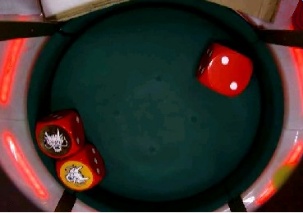
Select your desired item and then enter it to display the snapshot.
6.6 SOUND SETTING
NOTE:
Because this menu can be opened without opening the main door, no soft meter will be cleared.
The SOUND SETTING consists of:
VOLUME SETTING, and
SOUND TEST.
6.6.1 VOLUME SETTING
Select “VOLUME SETTING” to set the game sound volume level.
VOLUME SETTING
MASTER VOLUME 25
BGM VOLUME 15
SE VOLUME 15
MASTER VOLUME
Set the volume for all the sounds beside BGM or SE.
BGM VOLUME
Set the volume for the BGM music.
SE VOLUME
Set the volume for the sound effects.
Adjust the volume levels by using the setting buttons.
MASTER VOLUME
max volume 30
VOLUME 25
min volume 5
20180824長野.ラウラ
フィリピン指摘
BGM VOLUME and SE VOLUME has a minimum volume of 1.
6.6.2 SOUND TEST
You can hear the background music and sound effects for a game play.
- Select your desired sound by using the UP/DOWN keys.
- Hear the sound by pressing ENTER key.
- To stop the sound, press the ESC key.
To go back to the previous screen page, press the ESC key again.
SOUND TEST
PAGE 1/7
1_mass_ma_common/count_ch.ogg
1_mass_ma_common/count_ch.egg
1_mass_ma_common/count_last.ogg
1_mass_ma_common/count/error.ogg
1_mass_ma_common/count/paysound.ogg
1_mass_ma_common/count/set_vol.ogg
6.7 MACHINE IDENTIFICATION
2017-03-06 Laura
Dragon Sicbo
SIGNAGE VERIFICATION 追加
The MACHINE IDENTIFICATION consists of;
SOFTWARE/FIRMWARE,
PSD VERIFICATION (MD5 & CRC),
PSD VERIFICATION (HMAC-SHA1),
SIGNAGE PSD VERIFICATION (SHA 1) and
GAME INFORMATION.
6.7.1 SOFTWARE/FIRMWARE
Select SOFTWARE/FIRMWARE to check your software/firmware.
SYSTEM SOFTWARE VERSION NUMBER
Shows the version number of your base software.
GAME SOFTWARE VERSION NUMBER
Shows the version number of your game software.
GAME GAL ID
Shows the ID number of your game GAL.
NOKI PCB FIRMWARE VERSION NUMBER
Shows the version number of your NOKI PCB firmware.
DOOR PCB FIRMWARE VERSION NUMBER
Shows the version number of your Door PCB firmware.
SIGA PCB FIRMWARE VERSION NUMBER
Shows the version number of your SIGA PBC.
SIGB PCB FIRMWARE VERSION NUMBER
Shows the version number of your SIGB PBC.
SIGC PCB FIRMWARE VERSION NUMBER
2017-03-06 Laura
SLAVE MEDIA VERSION (if any)は無くても大丈夫なので削除
Shows the version number of your SIGC PBC.
MASTER MEDIA VERSION
Shows the version number of your master media.
NOTE:
When the game starts up, the station loads the game software, system software, BODY PCB firmware, and DOOR PCB firmware for the station from the Center Unit to the station. Therefore, it is necessary to replace the Center Unit CF when upgrading (or downgrading) the station software.
The software versions displayed on the power-up self-test screen of the station are based on the results of loading software and firmware from the Center Unit to the station.
6.7.2 PSD VERIFICATION (MD5 & CRC)
PSD VERIFICATION (MD5 & CRC)
CHANGE SEED VALUE
SEED VALUE 0xFFFF
CRC CALCULATION NOT CALCULATED
MASTER MEDIA MD5 NOT CALCULATED
STATION BINARY DATA MD5 NOT CALCULATED
CHANGE SEED VALUE
CALCULATE
EXIT
PSD VERIFICATION (MD5 & CRC)
CHANGE SEED VALUE
SEED VALUE 0xFFFF
CRC CALCULATION NOT CALCULATED
MASTER MEDIA MD5 NOT CALCULATED
ETC : (0001/0015) S_BS001_01_NML.ogg
CHANGE SEED VALUE
CALCULATE
EXIT
SEED VALUE
Shows the current seed value.
CRC CALCULATION
Shows the calculated CRC value of the compact flash.
MASTER MEDIA MD5
Shows the calculated MD5 value of the compact flash.
STATION BINARY DATA MD5
Shows the calculated MD5 binary data value.
Use the following buttons to calculate the above values.
CHANGE SEED VALUE:
Used to change the seed value.
(The current seed value is displayed as “original”.)
SEED VALUE SETTING
SEED VALUE
0x7d29
Maximum 0xffff
Minimum 0x0000
original 0xffff
1
2
3
4
5
6
0
7
9
a
b
c
d
e
f
8
ENTER
DELETE
CLEAR
CANCEL
CALCULATE:
Used to calculate CRC and MD5 values with the changed seed value.
To stop the calculation, press the “STOP” button.
PSD VERIFICATION (MD5 & CRC)
SEED VALUE 0x0000
CRC CALCULATION CALCULATING
MASTER MEDIA MD5 CALCULATING
STATION BINARY DATA MD5 CALCULATING
STOP
6.7.3 PSD VERIFICATION (HMAC-SHA1)
20170426 ラウラ
修正
Select “PSD VERIFICATION (HMAC-SHA1),” to see the HMAC-SHA1 values of the compact flash.
PSD VERIFICATION (HMAC-SHA1)
CHANGE SEED VALUE
SEED VALUE 00
MASTER HMAC-SHA1 NOT CALCULATED
CHANGE SEED VALUE
CALCULATE
EXIT
20170426 ラウラ
修正
SEED VALUE
Shows the current seed value.
MASTER HMAC-SHA1
Shows the calculated HMAC-SHA1 value of the compact flash.
Use the following buttons to calculate the above values.
CHANGE SEED VALUE:
Used to change the seed value.
(The current seed value is displayed as “original”.)
SEED VALUE SETTING
SEED VALUE
Setting value
Current value
00
1
2
3
4
5
6
0
7
9
a
b
c
d
e
f
8
ENTER
DELETE
CLEAR
CANCEL
20170426 ラウラ
修正
CALCULATE:
Used to calculate HMAC-SHA1 values with the changed seed value.
To stop the calculation, press the “STOP” button.
PSD VERIFICATION (HMAC-SHA1)
STOP
SEED VALUE 0x0000
MASTER HMAC-SHA1 CALCULATING
STOP
6.7.4 SIGNAGE PSD VERIFICATION (SHA1)
2017-03-06 Laura
Dragon Sicbo
SIGNAGE VERIFICATION 追加
Select “SIGNAGE PSD VERIFICATION” to verify the software of the SIGNAGE SSD.
Select “CALCULATE” to start the calculation.
CALCULATE
EXIT
SIGNAGE PSD VERIFICATION (SHA1)
CALCULATE
SIGNAGE SHA1
Change the display source using the OSD Keypad, to display the calculation results.
NOTE:
For more details about the OSD keyboard, please refer to Paragraph 9.8 of the SERVICE Manual.
2017-03-06 Laura
「OSD Keypadを使って、DisplayのSourceを切り替えると、計算の結果が表示されています」
PSD VERIFICATION (SHA1)
PARTITION #1 (OS) :XXXXXXXXXXXXXXXXXXXXXXXXXX
PARTITION #2 (BASE CODE) :XXXXXXXXXXXXXXXXXXXXXXXXXX
PARTITION #3 (GAME CODE) :XXXXXXXXXXXXXXXXXXXXXXXXXX
OS VERSION :XXXXXXXX
SYSTEM SOFTWARE :XXXXXXXXXXXXX
GAME SOFTWARE :XXXXXXXXXXXXX
PARTITION #1 (OS)
Calculate the value of the OS data partition on the Signage SSD.
PARTITION #2 (BASE CODE)
Calculate the value of the Base Code data partition on the Signage SSD.
PARTITION #3 (GAME CODE)
Calculate the value of the Game Code data partition on the Signage SSD.
OS VERSION
Shows the OS Version of the Signage SSD.
SYSTEM SOFTWARE
Shows the System Software code of the Signage SSD.
GAME SOFTWARE
Shows the Game Software code of the Signage SSD.
6.7.5 GAME INFORMATION
2018/02/22 LAURA
IMPORTANT SETTINGSのJACKPOT CHANCE SETTINGは“PROGRESSIVE JACKPOT”に設定すると、GAME INFORMATIONは下記のように表示されています
If JACKPOT CHANCE SETTING on IMPORTANT SETTINGS is set to “PROGRESSIVE JACKPOT”, GAME INFORMATION is displayed as following:
GAME TITLE
VARIATION
PAYTABLE ID
SIC BO GAME RTP
MULTIPLIER CHARNCE RTP
COMBINED RTP OF SICBO GAME + MULTIPLIER CHANCE
JACKPOT CHANCE RTP
EXPECTED OVERALL RTP
NUMBER OF BET SPOT
< SICBO GAME >
MINIMUM RTP
MAXIMUM RTP
MAXIMUM ODDS
< JACKPOT CHANCE >
MINIMUM RTP (PROGRESSIVE + BONUS)
MAXIMUM RTP (PROGRESSIVE + BONUS)
TOTAL PROGRESSIVE RTP
MEGA PROGRESSIVE RTP
MEGA PROGRESSIVE STARTUP RTP
MEGA PROGRESSIVE INCREMENT
MEGA PROGRESSIVE STARTUP VALUE
MEGA PROGRESSIVE HIT PROBABILITY
MAJOR PROGRESSIVE RTP
MAJOR PROGRESSIVE STARTUP RTP
MAJOR PROGRESSIVE INCREMENT
MAJOR PROGRESSIVE STARTUP VALUE
MAJOR PROGRESSIVE HIT PROBABILITY
MINI PROGRESSIVE RTP
MINI PROGRESSIVE STARTUP RTP
MINI PROGRESSIVE INCREMENT
MINI PROGRESSIVE STARTUP VALUE
MINI PROGRESSIVE HIT PROBABILITY
TOTAL BONUS CREDIT PRIZE RTP
BONUS CREDIT PRIZE 1 RTP
BONUS CREDIT PRIZE 1 VALUE
BONUS CREDIT PRIZE 1 HIT PROBABILITY
BONUS CREDIT PRIZE 2 RTP
BONUS CREDIT PRIZE 2 VALUE
BONUS CREDIT PRIZE 2 HIT PROBABILITY
BONUS CREDIT PRIZE 3 RTP
BONUS CREDIT PRIZE 3 VALUE
BONUS CREDIT PRIZE 3 HIT PROBABILITY
BONUS CREDIT PRIZE 4 RTP
BONUS CREDIT PRIZE 4 VALUE
BONUS CREDIT PRIZE 4 HIT PROBABILITY
BONUS CREDIT PRIZE 5 RTP
BONUS CREDIT PRIZE 5 VALUE
BONUS CREDIT PRIZE 5 HIT PROBABILITY
CRC SIGNATURE
MASTER MEDIA (MD5)
MASTER MEDIA (HMAC-SHA1)
2017/09/22 Laura
項目変更
2018/02/22 LAURA
修正
If JACKPOT CHANCE SETTING on IMPORTANT SETTINGS is set to “FIXED JACKPOT”, GAME INFORMATION is displayed as following:
2018/02/22 LAURA
IMPORTANT SETTINGSのJACKPOT CHANCE SETTINGは“FIXED JACKPOT”に設定すると、GAME INFORMATIONは下記のように表示されています
GAME TITLE
VARIATION
PAYTABLE ID
SIC BO GAME RTP
MULTIPLIER CHARNCE RTP
COMBINED RTP OF SICBO GAME + MULTIPLIER CHANCE
JACKPOT CHANCE RTP
EXPECTED OVERALL RTP
NUMBER OF BET SPOT
< SICBO GAME >
MINIMUM RTP
MAXIMUM RTP
MAXIMUM ODDS
< JACKPOT CHANCE >
MINIMUM RTP (PROGRESSIVE + BONUS)
MAXIMUM RTP (PROGRESSIVE + BONUS)
TOTAL JACKPOT RTP
MEGA JACKPOT RTP
MEGA JACKPOT VALUE
MEGA JACKPOT HIT PROBABILITY
MAJOR JACKPOT RTP
MAJOR JACKPOT VALUE
MAJOR JACKPOT HIT PROBABILITY
MINI JACKPOT RTP
MINI JACKPOT VALUE
MINI JACKPOT PROBABILITY
TOTAL BONUS CREDIT PRIZE RTP
BONUS CREDIT PRIZE 1 RTP
BONUS CREDIT PRIZE 1 VALUE
BONUS CREDIT PRIZE 1 HIT PROBABILITY
BONUS CREDIT PRIZE 2 RTP
BONUS CREDIT PRIZE 2 VALUE
BONUS CREDIT PRIZE 2 HIT PROBABILITY
BONUS CREDIT PRIZE 3 RTP
BONUS CREDIT PRIZE 3 VALUE
BONUS CREDIT PRIZE 3 HIT PROBABILITY
BONUS CREDIT PRIZE 4 RTP
BONUS CREDIT PRIZE 4 VALUE
BONUS CREDIT PRIZE 4 HIT PROBABILITY
BONUS CREDIT PRIZE 5 RTP
BONUS CREDIT PRIZE 5 VALUE
BONUS CREDIT PRIZE 5 HIT PROBABILITY
CRC SIGNATURE
MASTER MEDIA (MD5)
MASTER MEDIA (HMAC-SHA1)
If JACKPOT CHANCE SETTING on IMPORTANT SETTINGS is set to “OFF”, GAME INFORMATION is displayed as following:
2018/02/22 LAURA
IMPORTANT SETTINGSのJACKPOT CHANCE SETTINGは“OFF”に設定すると、GAME INFORMATIONは下記のように表示されています
GAME TITLE
VARIATION
PAYTABLE ID
SIC BO GAME RTP
MULTIPLIER CHARNCE RTP
COMBINED RTP OF SICBO GAME + MULTIPLIER CHANCE
EXPECTED OVERALL RTP
NUMBER OF BET SPOT
< SICBO GAME >
MINIMUM RTP
MAXIMUM RTP
MAXIMUM ODDS
CRC SIGNATURE
MASTER MEDIA (MD5)
MASTER MEDIA (HMAC-SHA1)
Following is the description for the items in Game Information. The items may be displayed with different names or not be displayed according to the settings as indicated above.
2018/02/22 LAURA
Game Informationの項目の説明です。
上記とおり、設定により項目は別の項目名で表示されたいる、または表示されていない場合もあります。
GAME TITLE
The official name of the game title.
2017/10/04 Laura
スペルミス
VARIATION
The PO variation number.
2018/02/22 LAURA
項目名変更
SIC BO GAME RTP
Shows the average RTP of the main game only.
MULTIPLIER CHANCE RTP
Shows the average RTP of the Multiplier chance game only.
COMBINED RTP OF SICBO GAME + MULTIPLIER CHANCE
Shows the average RTP of the main game and the Multiplier chance game.
JACKPOT CHANCE RTP
2017/09/25 Laura
追加
Shows the average RTP for the side game only.
EXPECTED OVERALL RTP
Shows the average RTP of the main game, the Multiplier chance game and the Side game.
20170822 Laura
修正
NUMBER OF BET SPOT
The number of the different spots on which it is possible to place a bet.
< SIC BO GAME >
2018/02/22 LAURA
項目名変更
MINIMUM RTP
Shows the minimum RTP.
2017/10/04 Laura
修正
2017/10/04 Laura
スペルミス
MAXIMUM RTP
Shows the maximum RTP.
MAXIMUM ODDS
Shows the odds for the highest pay spot, when the maximum multiplier (x8) is active.
< JACKPOT CHANCE >1
2018/02/22 LAURA
項目名変更
20170426 ラウラ
修正
MINIMUM RTP (PROGRESSIVE + BONUS)
Shows the lowest RTP for the side game.
MAXIMUM RTP (PROGRESSIVE + BONUS)
Shows the highest RTP for progressive and bonus.
2017-02-14 ラウラ
修正
TOTAL PROGRESSIVE RTP or TOTAL JACKPOT RTP
Shows the total RTP for the jackpot prizes.
[[ MEGA – MAJOR – MINI ]] PROGRESSIVE RTP or JACKPOT RTP
2018/02/22 LAURA
修正
Shows the RTP for each of the jackpot prizes.
[[ MEGA – MAJOR – MINI ]] PROGRESSIVE STARTUP RTP
Shows the startup RTP for each of the progressive prizes.
[[ MEGA – MAJOR – MINI ]] INCREMENT
Shows the increment for each of the progressive prizes.
2018/02/22 LAURA
誤記修正
[[ MEGA – MAJOR – MINI ]] PROGRESSIVE STARTUP VALUE (MINIMUM VALUE) or JACKPOT VALUE
Shows the startup value for each of the jackpot prizes.
2018/02/22 LAURA
修正
[[ MEGA – MAJOR – MINI ]] MAXIMUM VALUE
Shows the maximum value for each of the progressive prizes.
[[ MEGA – MAJOR – MINI ]] PROGRESSIVE HIT PROBABILITY or JACKPOT HIT PROBABILITY
2018/02/22 LAURA
修正
Shows the hit probability for each of the jackpot prizes.
TOTAL BONUS CREDIT PRIZE RTP
2017-02-14 ラウラ
Dragon Sicbo 追加
Shows the total RTP for all the credit prizes.
BONUS CREDIT PRIZE 1-5 RTP
Shows the RTP for each of the credit prizes.
2017/09/22 Laura
追加
BONUS CREDIT PRIZE 1-5 VALUE
Shows the value of each of the credit prizes.
2017/10/04 Laura
スペルミス
BONUS CREDIT PRIZE 1-5 HIT PROBABILITY
Shows the hit probability for each of the credit prizes.
CRC SIGNATURE
Shows the calculated CRC value calculated in PSD VERIFICATION.
2017/09/22 Laura
Slave media 消しました
MASTER MEDIA (MD5)
2017/09/22 Laura
Slave media 消しました
20170822 Laura
追加
20170822 Laura
追加
Shows the calculated MD5 value calculated in PSD VERIFICATION.
MASTER MEDIA (HMAC-SHA1)
Shows the calculated HMAC-SHA1 value for the Master Media calculated in PSD VERIFICATION.
Chapter 7: Error Messages
オリギナル:⑫07(WHEEL)Error Messages (WW_OP)改定 20160331ラウラ
This chapter shows the error messages and their remedial actions as well as the door status event.
 CALL SERVICE IMMEDIATELY!
The errors with “CALL SERVICE IMMEDIATELY!” in this chapter could potentially cause serious financial loss to the casino.
If an error occurs, immediately turn off the machine and call the Aruze Gaming office in your area.
 WARNING!
Accessing into the cabinet must be performed by qualified maintenance/service personnel.
7.1 Error Messages on Center(Main) Unit
If an error occurred on the Center(Main) unit, all the games are halted with an error message on the station LCD’s and the Center(Main) unit LCD monitor.
 WARNING!
Before clearing an error on the Center(Main) unit, check the machine carefully for a cheat.
Every after turning OFF and ON the Center(Main) unit (including recovery from power failure), make sure to turn OFF and ON the stations.
7.1.1 Start-up SelfTest Errors
2016.10.04 Laura
追加
| Message | Normal Message | Error Message | Cause | Remedy |
| NOKI PCB communication test | CONNECTED | DIS- CONNECTED | A NOKI I/O communication error occurred. | Turn the Center(Main) unit OFF and ON. 1. Turn OFF the Center(Main) unit.
|
| DOOR PCB communication test | CONNECTED | DIS- CONNECTED | A DOOR I/O communication error occurred. | Turn the Center(Main) unit OFF and ON. 1. Turn OFF the Center(Main) unit.
Refer to Service Manual, Paragraph 11.1. |
| EEPROM test | OK | FAULT | The EEPROM is damaged. | Refer to Service Manual, Paragraph 11.1. |
| Program test | OK | CRACKED | The Compact Flash corrupted. | Referring to Service Manual, Paragraph 9.7.7, replace the Compact Flash. |
| Message | Normal Message | Error Message | Cause | Remedy |
| GAL test | OK | CHANGED | The GAL has been replaced with a different, but compatible GAL | Refer to Service Manual, Paragraph 11.1 |
| GAME ID UNMATCHED | The ID of the GAL does not match to the one of the Compact Flash. | Refer to Service Manual, Paragraph 11.1. | ||
| FAULT | The Center(Main) unit could not read the data of GAL, or the GAL is damaged. 2016.10.04 Laura 追加 | Refer to Service Manual, Paragraph 11.1. | ||
| SETTING-GAL | Displayed when using a NV GAL. | This is not an error. The machine will automatically continue to load the setting screen. | ||
| NOKI PCB test | OK | CHANGED | The NOKI I/O PCB was replaced. | Turn the RESET keyswitch. |
| CRACKED | The back-up RAM of the NOKI I/O PCB is corrupted. | Turn the RESET keyswitch to clear the SRAM of the NOKI I/O PCB. | ||
| DOOR PCB test | OK | CHANGED | The DOOR I/O PCB was replaced. | Turn the RESET keyswitch. |
| CRACKED | The back-up RAM of the DOOR I/O PCB is corrupted. | Turn the RESET keyswitch to clear the SRAM of the DOOR I/O PCB. | ||
| GMEM PCB test | OK | FAULT | The GMEM PCB was damaged. | Referring to Service Manual, Paragraph 9.6.2, replace the GMEM PCB. |
| CPU fan test | OK | FAULT | A CPU fan error occurred. | Refer to Service Manual, Paragraph 11.1. |
| SECURITY CAGE fan test | OK | FAULT | A security cage fan error occurred. | Refer to Service Manual, Paragraph 11.1. |
| Backup battery test | OK | LOW | The backup battery on the main PCB is low. | Refer to Service Manual, Paragraph 11.1. |
| Message | Normal Message | Error Message | Cause | Remedy |
| Backup memory test | OK | POWER OFF DURING WRITING | A power failure occurred during time when data was written on the backup RAM. | Turn the RESET keyswitch. |
| CRACKED | The RAM is defective, or the RAM was corrupted. | Clear the RAM by referring to Service Manual, Paragraph 9.1. | ||
| Backup version test | OK | FAULT | The program media or GAL was replaced. | Clear the RAM Refer to Service Manual, Paragraph 9.1. |
7.1.2 System Errors
| Message | Cause | Remedy |
| LOW BACKUP BATTERY (GMEM PCB) | The backup battery on the GMEM PCB is low. |
|
| LOW BACKUP BATTERY (NOKI PCB) | The backup battery on the NOKI PCB is low. | 1. Referring to our Service Manual, Paragraph 9.7.6, replace the backup battery. 2. After the intervention, turn the RESET keyswitch. |
| LOW BACKUP BATTERY (DOOR PCB) | The backup battery on the DOOR PCB is low. 2016.10.04 Laura 追加 |
|
| CPU FAN ABNORMAL | A CPU fan error occurred. | 1. Referring to Service Manual, Paragraph 9.7.2, take out the security cage. 2. Wait until the PCBs cool down. 3. Replace the CPU fan. 4. After the intervention, turn the RESET keyswitch. |
Message 2016.10.04 Laura 追加 | Cause | Remedy |
| SECURITY CAGE FAN ABNORMAL | A security cage fan error occurred. | 1. Referring to our Service Manual, Paragraph 9.6, take out the security cage. 2. Wait until the PCB’s cool down. 3. Replace the security cage fan. 4. After the intervention turn the RESET keyswitch. |
| CONTROL BOX FAN ABNORMAL | A control box fan error occurred | 1. Referring to our Service Manual, Paragraph 9.6, open the door of the control box. 2. Replace control box cage fan. 3. After the intervention turn the RESET keyswitch |
| MEDIA REMOVED DURING POWER DOWN | The program media was removed during power down. | Turn the RESET keyswitch. |
| IDE CABLE DISCONNECTED DURING POWER DOWN | The IDE cable was disconnected during power down. | Turn the RESET keyswitch. |
| COMMUNICATION ERROR –NOKI PCB | A NOKI or DOOR communication error occurred. | Referring to our Service Manual, Paragraph 9.6, check if the USB cable is securely connected to the NOKIor DOOR PCB. If the error persists, replace the NOKI or DOOR PCB. |
| COMMUNICATION ERROR –DOOR PCB | ||
| No.1 FAN ABNORMAL | The fan No.1 was abnormal. 2016.10.21 修正 | 1. Referring to our Service Manual, Paragraph 9.7.2, access to the fan No.1. 2. Replace fan No.1. 3. After the intervention turn the RESET keyswitch. |
| No.2 FAN ABNORMAL | The fan No.2 was abnormal. | 1. Referring to our Service Manual, Paragraph 9.7.2, access to the fan No.2. 2. Replace fan No.2. 3. After the intervention turn the RESET keyswitch. |
| No.3 FAN ABNORMAL | The fan No.3 was abnormal. | 1. Referring to our Service Manual, Paragraph 9.7.2, access to the fan No.3. 2. Replace fan No.3. 3. After the intervention turn the RESET keyswitch. |
Message 2016.10.31 シックボNSWから追加 2016.10.21 クラップスから追加 | Cause | Remedy |
| No.4 FAN ABNORMAL | The fan No.4 was abnormal. 2016.10.04 Laura 追加 | 1. Referring to our Service Manual, Paragraph 9.7.2, access to the fan No.4. 2. Replace fan No.4. 3. After the intervention turn the RESET keyswitch. |
| RAM CORRUPTED | The RAM corrupted. | Referring to our Service Manual, Paragraph 9.7.7, replace the Compact Flash. |
| POWER OFF DURING SETTING | The power was turned off during setting. | Turn the RESET keyswitch. |
| GAME PROGRAM MISMATCH | The RAM is defective, or the RAM was corrupted. | Clear the RAM by referring to our Service Manual, Paragraph 9.1. |
| PROGRAM CORRUPTED | The compact flash corrupted. | Clear the RAM by referring to our Service Manual, Paragraph 9.1. |
| POWER RESET | The Center(Main) unit has been recovered from power down or an instantaneous power failure. | The error message automatically disappears. |
| FIRM CORRUPTED | The firmware corrupted. | Replace the NOKI or DOOR PCB. |
| BACKUP MEMORY SYNC ERROR | Data cannot be properly saved in the Backup RAM memory. | The lockup can be cleared by performing RAM Clear. If the error repeats, change the GMEM PCB. |
| LIVE CAMERA DISCONNECTED | When installing a not-supported live camera | Referring to Service Manual, OTHER SETTING> LIVE CAMERA ADDRESS |
シンガポール以外の仕向けにも記載
20180824加藤
2018-07-26ラウラ
追加
BACKUP MEMORY SYNC ERROR:
(原因) Backup RAMにデータを正しく保存できません
(対策)RAM Clearを行って、LockUpクリアーができます。問題が繰り返さないためにGMEM PCB交換します。
7.1.3 Door Events
内容は機種によって異なる
20151014長野
 CALL SERVICE IMMEDIATELY!
If the meter increases despite not opening and closing the door, immediately turn off the machine and call the Aruze Gaming office in your area.
| Message | Cause |
| NO.1 MAIN DOOR OPEN | The main door switch No.1 detected a door OPEN. The message automatically disappears when the door is closed. |
| NO.2 MAIN DOOR OPEN | The main door switch No.2 detected a door OPEN. The message automatically disappears when the door is closed. |
| NO.3 MAIN DOOR OPEN | The main door switch No.3 detected a door OPEN. The message automatically disappears when the door is closed. |
| NO.1 SECURITY AREA DOOR OPEN | The security cage door switch No.1 detected a door OPEN. The message automatically disappears when the door is closed. |
| NO.2 SECURITY AREA DOOR OPEN | The security cage door switch No.2 detected a door OPEN. The message automatically disappears when the door is closed. |
| FIELD AREA DOOR OPEN | The field area door switch detected a door OPEN. The message automatically disappears when the door is closed. |
2016.10.04 Laura
追加
7.1.4 Dice Errors
| Message | Cause | Remedy |
| DICE INIT ERROR | The initialization of the dice level was failed. | Turn the RESET keyswitch. If the error persists, refer to our Service Manual, Paragraph 11.3. |
| SENSOR OPEN ERROR | The initialization of the dice spot reading sensor was failed. | Turn the RESET keyswitch. If the error persists, refer to our Service Manual, Paragraph 11.3. |
| ACTUATOR ERROR | The control of the cylinder operation was failed. | Turn the RESET keyswitch. If the error persists, refer to our Service Manual, Paragraph 11.3. |
| Message | Cause | Remedy |
| SENSOR DATA ERROR | The data read by the dice spot reading sensor was abnormal. | Call the DICE ROLL UNIT TEST to check all the spots of the dice are normally read. Turn the RESET keyswitch. |
| SENSOR TIMEOUT ERROR | The dice spot reading sensor received no data. 2018.02.22 Laura追加:ドラゴン用加速度版の表示らしい。リセット以外の設定が追加されている。 | Turn the RESET keyswitch. If the error persists, refer to our Service Manual, Paragraph 11.3. |
NO DICE NO DICE (LOCKUP) | The dice spot reading sensor read only one or two dice spots. | Attendant process or turn the RESET keyswitch. Refer to our Service Manual, Paragraph 11.3. |
| DICE READ ERROR | The dice spot reading sensor detected no dice or 4 or more dice. | Call the DICE ROLL UNIT TEST to check all the spots of the dice are normally read. Turn the RESET keyswitch after the intervention. If the error is not still cleared, check the sensor. |
| CONSECUTIVE SAME RESULTS OF THREE DICE | All the 3 dice showed the same spot over 4 times in a row. | Call the DICE ROLL UNIT TEST to check all the spots of the dice are normally read. Turn the RESET keyswitch after the intervention. |
| CONSECUTIVE SAME RESULTS OF A DICE | One of the 3 dice showed the same spot over 10 times in a row. 2016.10.21 シックボ専用 | Call the DICE ROLL UNIT TEST to check all the spots of the dice are normally read. Turn the RESET keyswitch after the intervention.. |
| Message | Cause | Remedy |
| CONSECUTIVE NO RESULT OF ANY SPOTS OF A DICE (DICE 1) | A certain spot was not shown by the number 1 dice over the predetermined number of times in a row. | Call the DICE ROLL UNIT TEST to check all the spots of the dice are normally read. 2016.10.21 シックボ専用 Turn the RESET keyswitch after the intervention. |
| CONSECUTIVE NO RESULT OF ANY SPOTS OF A DICE (DICE 2) | A certain spot was not shown by the number 2 dice over the predetermined number of times in a row. | |
| CONSECUTIVE NO RESULT OF ANY SPOTS OF A DICE (DICE 3) | A certain spot was not shown by the number 3 dice over the predetermined number of times in a row. | |
| GAME FAILURE ERROR | A game play could not be executed because of an error or a door OPEN error. | Call the DICE ROLL UNIT TEST to check all the spots of the dice are normally read. 20170728 長野,ラウラ 連続した100ゲームの範囲内で、“NO DICE判定”が”NO DICE LOCKUP INTERVAL”で任意に設定した回数発生した Turn the RESET keyswitch after the intervention. |
| DICE FAILURE | Within 100 consecutive games, a “NO DICE condition” has been detected the same number of times as set on “NO DICE LOCKUP INTERVAL”. | Turn the RESET keyswitch. Refer to Paragraph 11.3. |
| MAIN UNIT FAILURE | A result of chi-square is not proper | Turn the RESET keyswitch. Refer to Paragraph 11.3. |
| SENSOR INIT ERROR | The initialization of the dice sensor was failed. | Turn the RESET keyswitch. If the error persists, replace the dice sensor. |
2017.04.261ラウラ
ダイス名を直しました
2016.10.21 クラップスから追加
2016.10.04 Laura
交換
7.1.5 Network Errors
| Message | Cause | Remedy |
| NETWORK ERROR | Communication was not established between the main unit controller and a station unit. | Refer to our Service Manual, Paragraph 11.4. |
| SIGNAGE COMMUNICATION ERROR | Communication was not established between the main unit controller and the Signage. | Refer to our Service Manual, Paragraph 11.4. |
7.1.6 Communication Errors
2018.02.22 Laura追加 サイネージには表示されても消えているはずなのでステーションで確認。ドラゴンはサイネージにAPXを持つが、メインのAPXとの通信不良により発生?
| Message | Condition | Remedy |
| COMMUNICATION DATA ERROR | The communication data is inappropriate. 当初WW版には無かったが、Communication Errorsは共通性が高く、そもそもエラーメッセージは発生しないと検索されないので、AUとの共通化の為に入れた。20151019 長野 | Check the cables and connectors that connect the Center(Main) and station units. When the problem is resolved, the message is automatically cleared. |
7.2 Errors Messages on Stations
If an error occurred on a station, the game on the station is halted with the error message on the station LCD.
タワーライトのどこが光るかの記述削除
20151014長野
7.2.1 Start-up Self Test Errors
| Message | Normal Message | Error Message | Cause | Remedy |
| BODY PCB communication test | CONNECTED この章はステーションなので機種による変化が無いと判断し、バーチャルと同じにした。 20151014長野 サービスの4章5章のパワーアップセルフテストエラーをこちらに移動した。20151015 シックボー、クラップスの修正時に7.2.2に追加した。 20161021長野 | DIS- CONNECTED | A BODY I/O communication error occurred. | The error is automatically cleared when the problem is resolved. If the error persists, refer to Service Manual, Paragraph 10.1. |
| DOOR PCB communication test | CONNECTED | DIS- CONNECTED | A DOOR I/O communication error occurred. | The error is automatically cleared when the problem is resolved. If the error persists, refer to Service Manual, Paragraph 10.1. |
| EEPROM test | OK | FAULT | The EEPROM is damaged. | Refer to Service Manual, Paragraph 10.1. |
| PROGRAM test | OK | CRACKED | The compact flash was corrupted. | Referring to Service Manual, Paragraph 8.8.4, replace the Compact flash. |
| BODY PCB test | OK | CHANGED | The firmware version of BODY PCB is not correct. | Refer to Service Manual, Paragraph 10.1. |
| CRACKED | The SRAM of the BODY PCB has been damaged. | Refer to Service Manual, Paragraph 10.1. | ||
| DOOR PCB test | OK | CHANGED | The firmware version of door PCB is not correct. | Refer to Service Manual, Paragraph 10.1. |
| CRACKED | The SRAM of the door PCB has been damaged. | Refer to Service Manual, Paragraph 10.1. | ||
| GMEM PCB test | OK | FAULT | An error occurred when accessing GMEM PCB. | Referring to Service Manual, Paragraph 8.8.4, replace the Compact flash. |
| Message | Normal Message | Error Message | Cause | Remedy |
| GAL test | OK | CHANGED | The GAL has been replaced with a different, but compatible GAL | Refer to Service Manual, Paragraph 10.1. |
| GAME ID UNMATCHED | The ID of the GAL does not match to the one of the compact flash. 2015/10/16ラウラ 一番分かりやすい説明入れました | Refer to Service Manual, Paragraph 10.1. | ||
| FAULT | This station could not read the data from the GAL, or the GAL is damaged. | Refer to Service Manual, Paragraph 10.1. | ||
| SETTING-GAL | Displayed when using a NV/AZ GAL. | This is not an error. The machine will automatically continue to load the setting screen. | ||
| CPU fan test | OK | FAULT | A CPU fan error occurred. | Refer to Service Manual, Paragraph 10.1. |
| SECURITY CAGE fan test | OK | FAULT | A security cage fan error occurred. | Refer to Service Manual, Paragraph 10.1. |
| Backup battery test | OK | LOW | The backup battery on the GMEM PCB got too low to keep its reliability. | Refer to Service Manual, Paragraph 10.1. |
| Backup memory test | OK | POWER OFF DURING WRITING | The power failure occurred during time when data was written on the backup RAM. | Turn the RESET keyswitch. |
| CRACKED | The RAM is defective, or the RAM was corrupted. | Clear the RAM. Refer to Service Manual, Paragraph 8.1. | ||
| Backup version test | OK | FAULT | The program media or GAL was replaced. | Clear the RAM. Refer to Service Manual, Paragraph 8.1. |
7.2.2 System Errors
この章はWW版
20150116長野
| Message | Cause | Remedy |
| LOW BACKUP BATTERY (GMEM PCB) | The backup battery on the GMEM PCB is low. |
|
| LOW BACKUP BATTERY (BODY PCB) | The backup battery on the BODY PCB is low. |
|
| LOW BACKUP BATTERY (DOOR PCB) | The backup battery on the DOOR PCB is low. | 1. Referring to Service Manual, Paragraph 8.8.3, replace the backup battery. 2. After the intervention, turn the RESET keyswitch. |
| CPU FAN ABNORMAL | A CPU fan error occurred. |
|
| SECURITY CAGE FAN ABNORMAL | A PCB box fan error occurred. |
|
| POWER RESET | The machine has been recovered from power down or an instantaneous power failure. | This message automatically disappears. |
| MEDIA REMOVED DURING POWER DOWN | The program media was removed during power down. | Turn the RESET keyswitch. |
| IDE CABLE DISCONNECTED DURING POWER DOWN | The IDE cable was disconnected during power down. | Turn the RESET keyswitch. |
| COMMUNICATION #1 ERROR (BODY PCB) | A BODY I/O communication error occurred. | Check if the USB cable is securely connected. If the error persists, replace the BODY PCB. |
| Message | Cause | Remedy |
| COMMUNICATION #2 ERROR (DOOR PCB) | A DOOR I/O communication error occurred. | Check if the USB cable is securely connected. If the error persists, replace the DOOR PCB. |
| POWER OFF DURING SETTING | The power was turned off during setting. | Turn the RESET keyswitch, and perform the setting again. |
| BODY PCB CHANGED | The ID of BODY PCB SRAM is not correct. | Turn the RESET keyswitch to clear the SRAM of BODY PCB. |
| DOOR PCB CHANGED | The ID of DOOR PCB SRAM is not correct. この章はWW版 20150116長野 | Turn the RESET keyswitch to clear the SRAM of the DOOR PCB. |
| BODY PCB SRAM ERROR | The SRAM of BODY PCB is abnormal. | Turn the RESET keyswitch to clear the SRAM of BODY PCB. |
| DOOR PCB SRAM ERROR | The SRAM of DOOR PCB is abnormal. | Turn the RESET keyswitch to clear the SRAM of the DOOR PCB. |
| RAM CORRUPTED | The RAM is defective, or the RAM was corrupted. | Clear the RAM. Refer to Service Manual, Paragraph 8.1. |
| PROGRAM CORRUPTED | The Compact Flash corrupted. | Turn the RESET keyswitch. |
| FIRM CORRUPTED | The firmware corrupted. | Replace the NOKI, DOOR, or DOOR PCB. |
7.2.3 Coin Acceptor Errors
Message 2016.10.21 クラップスから追加 | Cause | Remedy |
| COIN IN JAM | A coin jam occurred at the coin-in sensor. この章はWW版 20150116長野 | Check for a coin jam or foreign material blocking the sensor. Refer to Paragraph 4.5. After intervention, turn the RESET keyswitch. |
| REVERSE COIN IN | The coin-in sensor detected a coin moving in the reverse direction. | Turn the RESET keyswitch. It means stringing. Call security! |
| COIN ACCEPTOR ERROR | A coin-in pulse error occurred. | Turn the RESET keyswitch. If the error persists, replace the coin acceptor. |
| DIVERTER ERROR | A coin-in was detected when the coin was sent to the cash box, and a coin-drop was detected when the coin was sent to the hopper. | Turn the RESET keyswitch. |
| COIN DROP JAM | The drop sensor kept ON during a preset time period. | Check for a coin jam or foreign material blocking the sensor. After intervention, turn the RESET keyswitch. |
7.2.4 Hopper Errors
| Message | Cause | Remedy |
| HOPPER RUNAWAY | The hopper malfunctioned and unexpectedly paid coins. | Turn the RESET keyswitch. |
| COIN OUT ERROR (HOPPER JAM) | A coin jam occurred in the hopper bowl or the coin-out path. この章はWW版 20150116長野 | Check the hopper bowl and the coin-out path for a coin jam. After intervention, turn the RESET keyswitch. |
| HOPPER TIMED OUT | The hopper is getting empty. | Check if there are enough coins in the hopper coin bowl. After refilling the hopper with coins, turn the RESET keyswitch. |
| EXTRA COINS PAID | The hopper paid extra coins. | Turn the RESET keyswitch. |
| HOPPER DISCONNECTED | The hopper was removed. | Set the hopper correctly. After intervention, turn the RESET keyswitch. |
7.2.5 Bill Acceptor Errors
| Message | Cause | Remedy |
BILL STACKER JAM この章はWW版 20150116長野 | A bill jam occurred at the bill stacker. | Check for a bill jam or foreign material blocking the entrance of the bill stacker. Refer to Service Manual, Paragraph 8.5. 最新に修正 20150116長野 参照先修正20161102 After intervention, turn the RESET keyswitch. |
| BILL ACCEPTOR JAM | A bill jam occurred at the bill acceptor module. | Check for a bill jam or foreign material blocking the sensor. After intervention, turn the RESET keyswitch. |
BILL STACKER REMOVED ルーレットに無かったので入れた。 20150116長野 | The bill stacker was removed. | Set the bill stacker correctly. (Turning the RESET keyswitch is not necessary.) |
| BILL STACKER FULL | The bill stacker is full. | Referring to Service Manual, Paragraph 8.4, collect bills from the bill stacker. 最新に修正 20150116長野 参照先修正20161102 |
| BILL ACCEPTOR COMMUNICATION ERROR | A communication error occurred in the bill acceptor. | Refer to Service Manual, Paragraph 10.4. |
| BILL ACCEPTOR FAILURE | The bill acceptor malfunctioned. | Turn the RESET keyswitch. |
| BILL ACCEPTOR PAUSE | The bill acceptor fell in a pause mode. | The message is automatically cleared when the problem is resolved. |
| Message | Cause | Remedy |
| BILL ACCEPTOR CHEAT | The bill acceptor detected a cheat. | Turn the RESET keyswitch. It means stringing. Call security! |
| EXCESSIVE BILL REJECTS | An inserted bill was consecutively rejected over 10 times. | Turn the RESET keyswitch. |
7.2.6 Ticket Printer Errors
この章はWW版。ルーレットと比べて
VALIDATION ID NOT CONFIGURED
TICKET HISTORY BUFFER FULL
が無かったが、正解。
木藤確認済み。20150119
参照先修正20161102
| Message | Cause | Remedy |
| TICKET PRINTER PAPER EMPTY | The paper was depleted. | Load tickets referring to Paragraph 2.5. (Turning the RESET keyswitch is not necessary.) |
| TICKET PRINTER PAPER LOW | The paper runs short. | Referring to Paragraph 2.5, load paper. (Turning the RESET keyswitch is not necessary.) |
| TICKET PRINTER PAPER JAM | A paper jam occurred. | Clear the jam referring to Paragraph 4.7. (Turning the RESET keyswitch is not necessary.) |
| TICKET PRINTER OPEN | The ticket cover was opened | Close the ticket cover. (Turning the RESET keyswitch is not necessary.) |
| TICKET PRINTER DISCONNECTED | The ticket printer was disconnected. | Refer to Service Manual, Paragraph 10.5. (Turning the RESET keyswitch is not necessary.) |
TICKET PRINTING ERROR VOID PRINTED TICKET AND REPRINT | The station is turned OFF and ON during time when a ticket is being printed. | Turn the RESET keyswitch. |
TICKET PRINTING ERROR REPRINT TICKET | An unknown error occurred on the FutureLogic ticket printer. | Turn OFF and ON the station. |
| TICKET PRINT TIMED OUT | A ticket could not be printed within the preset time period. | Turn the RESET keyswitch. |
7.2.7 Communication Errors
この章はWW版
20150116長野
参照先修正20161102
| Message | Cause | Remedy |
| COMMUNICATION DATA ERROR | Communicated data were not correct. | Refer to Service Manual, Paragraph 10.3. The message is automatically cleared when the problem is resolved. |
| COMMUNICATION OFFLINE ERROR | The station did not receive any message from the Host for the preset time period. | Refer to Service Manual, Paragraph 10.3. The message is automatically cleared when the problem is resolved. |
| MACHINE DISABLE FROM HOST | The station was disabled by the Host. | Refer to Service Manual, Paragraph 10.3. The message is automatically cleared when the problem is resolved. |
| HOST COMMUNICATION LINK DOWN | The communication with the Host was lost. | Refer to Service Manual, Paragraph 10.3. The message is automatically cleared when the problem is resolved. |
7.2.8 Network Error
| Message | Cause | Remedy |
| MAIN UNIT NETWORK ERROR | Communication was not established between the Center(Main) and a station unit. | Reconnect the LAN cable, and Turn the RESET keyswitch(The Station Unit) NOTE: The Center(Main) unit locks up if the same error occurs on the same station within 24 hours even if the Center(Main) unit is operating normally. |
7.2.9 Door Events
バーチャルの内容に統一
20151014長野
タワーライトのどこが光るかの記述削除
20151014長野
 CALL SERVICE IMMEDIATELY!
If the meter increases despite not opening and closing the door, immediately turn off the machine and call the Aruze Gaming office in your area.
| Message | Cause |
MAIN DOOR OPEN (MECHANICAL SWITCH) NOTE1 | A door open was detected by the mechanical switch on the main door. Close the door, and turn the RESET keyswitch to clear the message. |
MAIN DOOR OPEN (OPTICAL SENSOR)NOTE1 | A door open was detected by optical sensor on the main door. Close the door, and turn the RESET keyswitch to clear the message. |
| FRONT DOOR OPEN (MECHANICAL SWITCH) NOTE1 | A door open was detected by the mechanical switch on the front door. Close the door, and turn the RESET keyswitch to clear the message. |
| FRONT DOOR OPEN (OPTICAL SENSOR)NOTE1 | A door open was detected by optical sensor on the front door. Close the door, and turn the RESET keyswitch to clear the message. |
| MAINTENANCE DOOR OPEN | A door open was detected by the mechanical switch on the power box door (maintenance door). Close the door, and turn the RESET keyswitch to clear the message. |
| HOPPER UNIT DOOR OPEN | A door open was detected by the mechanical switch on the hopper door. Close the door, and turn the RESET keyswitch to clear the message. |
| COIN DROP DOOR OPEN | The door of the coin drop box is open. Close the door, and turn the RESET keyswitch to clear the message. |
| SECURITY CAGE OPEN | The door of the security cage is open. Close the security cage and turn the RESET keyswitch to clear the message. |
| STACKER DOOR OPEN | The door of the bill stacker is open. Close the door, and turn the RESET keyswitch to clear the message. |
| BODY PCB OPEN | The BODY PCB cover was removed. Close the door, and turn the RESET keyswitch to clear the message. |
| Message | Cause |
| SECURITY CAGE ACCESS DURING POWER DOWN | The door of the security cage was opened during the time the power was down. Close the door, and turn the RESET keyswitch to clear the message. |
| BODY PCB ACCESS DURING POWER DOWN | The BODY PCB was accessed during the time the power was down. ビッグウィール LOWペイアウトから修正コピー。ワイドステーションはCOIN DROP DOORなので名称変更。以後ワイドステーションの共通項目とした。20161107 Return the BODY PCB cover, and turn the RESET keyswitch to clear the message. |
| MAIN DOOR ACCESS DURING POWER DOWN | The main door was opened during power down. Close the door, and turn the RESET keyswitch to clear the message. |
| FRONT DOOR ACCESS DURING POWER DOWN | The front door was opened during power down. Close the door, and turn the RESET keyswitch to clear the message. |
COIN DROP DOOR ACCESS DURING POWER DOWN | The coin drop door was opened during the time the power was down. Close the door, and turn the RESET keyswitch to clear the message. |
NOTE 1:
The main door OPEN is detected by both of the mechanical switch and the optical sensor.
However, the message of mechanical switch precedes the one of the optical sensor.
20170317ラウラ
追加
7.2.10 Macau requirement errors
NOTE
This error appears in Macao version only.
| Message | Cause |
| UNREASONABLE METER INCREMENT | An incorrect side bet amount has been sent by the station to the Center(Main) unit, as jackpot increment. Turn the RESET keyswitch to clear the message. |
Macau requirement errorsは、マカオにのみ適用されるエラー。ステーションから送信したBET値とCenter(Main)の値が一致しない時に出る。Center(Main)のメーターにカウントされるだけなので、ステーションはリセットで復帰する。ドラゴンだけではなく、シックボー、クラップス、ルーレット、バカラなどのマカオ向けのマス機に順次適用される予定。7章は各機種ごとに分かれている。
7.2.10を足しただけなので、マカオ以外の仕向け地にも共通で使用する。
20170321長野
Chapter 9: Machine Specifications
9.1 Overall Dimension
| Width | Depth | Height | |
| Whole Machine | 2798mm | 2798mm | 2723mm |
| Center Unit | 1721mm | 1721mm | 2723mm |
| Coinless Station | 700mm | 693mm | 1005mm |
| Coin Handling Station | 700mm | 774mm | 1005mm |
9.2 Weight
| Center Unit | 650 Kg |
| Coinless Station | 113 Kg /St. |
| Coin Handling Station | 128 Kg /St. |
9.3 Environment
| Ambient temperature | 5 through 35 degrees℃ |
| Ambient humidity | 30 through 60% Free from dew condensation |
9.4 Bills/Coins Capacity
| Bill stacker | |
| UBA/WBA (JCM) | About 500 Bills |
| FrontLoad (CashCode) | About 600 Bills |
| Cashflow (MEI) | About 500 Bills |
| Hopper | |
| Coin Size | Approx Capacity |
| 28.4mm dia x 2.21mm thkns | 800 coins |
| 24.25mm dia x 1.75mm thkns | 1600 coins |
9.5 Electrical Specifications
Supply Voltage Requirements
| Rated voltage | frequency | |
| Mains Input Voltage | 100 – 120VAC | 50 / 60Hz |
| 220 – 240VAC |
Power Requirements – Center Unit (without Projector)
| Mains Input Current | 100-120VAC | 220-240VAC |
| EGM Maximum (* Includes the Outlet Current) | 14.9 A | 6.7 A |
| EGM Typical | 8.0 A | 4.0 A |
| Power Consumption at Nominal Voltage | 100-120VAC | 220-240VAC |
| EGM Typical | 858 W | 855 W |
| Typical Heat Load | 2929 BTU/hr | 2917 BTU/hr |
Power Requirements
| Maximum Load Current | 100-120VAC | 220-240VAC |
| Auxiliary Power Outlet | N/A | N/A |
| Power Consumption at Nominal Voltage | 100-120VAC | 220-240VAC |
| EGM Maximum (excluding auxiliary loads) | Maximum allowed by PSU | Maximum allowed by PSU |
9.6 Key Lock Specifications
The machine is shipped with generic door locks installed.
For increase security, the following door locks should be replaced:
| Location of locks | Number of locks |
| Center Unit | |
| Main door (L and R) | 8 pc |
| Control Box door | 1 pc |
| Driver Case door | 1 pc |
| Head door | 1 pc |
| AP-X door | 1 pc |
| Spacer Control Unit | |
| Door | 1 pc |
| Stations | |
| Main door | 1 pc |
| Front door | 1 pc |
| Power box door | 1 pc |
| Security cage door | 1 pc |
| Bill stacker door | 1 pc |
| Hopper door if any | 1 pc |
| Coin drop box door if any | 1 pc |
< Lock Dimensions >
33.8mm (1.33″)
6.3mm (0.25″)
17.4mm (0.69″)
M19
M7
5.4mm (0.21″)
15.8mm (0.62″)
< Lock Installing Hole >
19.3 mm (0.76″)
16.2mm (0.64″)
EDITORIAL HISTORY
| Version # | Date | Contents |
| 7D-SIC-OP-ALL-001 | 2017/3/30 | – |
| 7D-SIC-OP-ALL-002 | 2017/5/15 | Correct minor errors. |
| 7D-SIC-OP-ALL-003 | 2017/7/27 | Correct minor errors. |
| 7D-SIC-OP-ALL-004 | 2017/8/21 | Correct minor errors. —-WW0124 通常ドラゴン WW0168が20180726に認可されたので、OPのエディトリアルにWW0168を追記。それ以外変更なし。 |
| 7D-SIC-OP-ALL-005 | 2017/10/5 | Correct minor errors. —-WW0140 |
| 7D-SIC-OP-ALL-006 | 2018/3/16 | Correct minor errors. —-WW0162 |
| 7D-SIC-OP-ALL-007 | 2018/6/14 | Add caution note. __WW0168 |
| 7D-SIC-OP-ALL-008 | 2018/9/19 | Updated Chapter 6 and 7. |
| 7D-SIC-OP-ALL-009 | 2018/10/11 | Updated Chapter 7. SG0704,–WW0173 |
| 7D-SIC-OP-ALL-010 | 2019/3/5 | Updated Chapter 3. |
| 7D-SIC-OP-ALL-011 | 2019/4/19 | Add Important notice for Maintenance. |
WW0168
(通常ドラゴン)
↓
WW0173
(チケプリ修正)
WW0166
(加速度ドラゴン)
↓
WW0171
(チケプリ修正)
20181010に加速度ドラゴンへWW0171を履歴に記載し、
既にシックボーに記載しているSG0704シンガポール対応20170726を7章に記載した。
通常ドラゴンも7章を共通使用しているので同時にSG0704シンガポール対応20170726を7章に記載した。20181011
20190123にWW0173が認可。内容はWW0171(WW0166加速度ドラゴンのチケプリ修正)から加速度部分を削除したもの。つまり、WW0173(WW0168通常ドラゴンのチケプリ修正)となる。下図参照